


To create a monthly budget, add up your take-home income, list your bills and everyday expenses, and set aside money for savings and costs that come up less often. Subtract everything you plan to spend or set aside from your income. Then put your paydays and bills on a calendar so you can see whether the money will be there when you need it.
Download the fillable monthly budget PDF below, or use the tables on this page. The worksheet compares planned and actual spending. The payday calendar checks whether money will be there when bills are due. The worked example shows how a budget with $80 left for the month can still come up $400 short on rent day.


1. Start with your monthly take-home income
Gather recent pay stubs, bank and card statements, and bills. Consumer.gov recommends starting with bills and pay stubs, then comparing what you planned with what you spent. For a paycheck, use the money you expect to receive after taxes and other payroll deductions. If health insurance already comes out of your paycheck, leave it out of your expense list. If you’re using a pay stub for the first time, check which take-home pay figure belongs in your budget.
Write down the amounts and dates of income you can reasonably count on this month. Include reliable benefits, support payments, or side income where applicable. If you work for yourself, start with what you can draw after business costs and money set aside for taxes. Count money that is already in checking as your opening balance on the payday table. It came from an earlier month.
What if your pay changes month to month?
Use a lower, reasonably typical month as a starting point for essentials if your hours, tips, or freelance income fluctuate. A look at the last year can help you estimate your average, especially if the work is seasonal. For a month with two biweekly paychecks, start with those two deposits. In a month with an additional paycheck, decide where it should go once you know when it will arrive.
2. List your bills, everyday spending, and occasional costs

Start with regular bills such as rent, insurance, subscriptions, and required debt payments. Then add flexible amounts for groceries, gas, utilities that change with use, and other spending. Use recent statements to estimate these amounts, including cash purchases you can reconstruct from receipts. For your first monthly food budget, separate groceries from takeout so you can see which estimate needs adjusting.
Look back farther for costs that could be missing from one month of statements. The Consumer Financial Protection Bureau recommends accounting for less frequent expenses when reviewing spending. Think about annual memberships, car registration, school expenses, or holiday travel and gift costs. If you expect a $360 insurance bill in six months and have saved nothing toward it, budget $60 a month. A sinking fund is a way to keep those contributions earmarked for the bill.
If two partners will maintain this plan, compare budgeting apps for couples on separate logins, private accounts, shared goals, and splitting bills.
3. Choose what to save and give each category a limit
Add transfers to savings and any extra debt payment you intend to make. Keep required payments in the expenses section so you can see how much they cost before sending extra money. Give flexible spending a realistic limit based on recent spending. A limit of $320 for dining, entertainment, and other optional purchases works only if you can cover the bills, savings, and debt payments you listed first.
Subtract planned spending and set-asides from take-home income. If the result is negative, revise the plan before the month begins. If it is positive, decide whether to leave part in checking for timing surprises, add to an emergency fund, or put it toward a specific goal. The 50/30/20 budget rule can give you category targets to compare with your own costs. If you set aside money for a specific target, track your financial goals by amount and deadline so you know how much to reserve next month.
A monthly budget example on $3,600 take-home pay
This household expects two $1,800 paychecks and plans to spend or set aside $3,520. Its budget includes everyday expenses, $150 for predictable bills that come up later, and $250 for emergencies. These are illustrative amounts you can replace with your own figures.
| Budget category | Monthly plan |
|---|---|
| Take-home income | $3,600 |
| Rent | $1,200 |
| Utilities and phone | $210 |
| Car payment and insurance | $340 |
| Required payments on other debt | $150 |
| Groceries | $430 |
| Transportation expenses | $180 |
| Household and medical expenses | $140 |
| Dining, entertainment, and other optional spending | $320 |
| Set-aside for nonmonthly bills | $150 |
| Emergency savings | $250 |
| Extra debt payment | $150 |
| Total spending and set-asides | $3,520 |
| Income left after the plan | $80 |
How to revise the plan when you go over
Suppose groceries cost $490 instead of $430, while everything else stays on plan. The extra $60 comes out of the $80 left over, leaving $20. For next month, you could raise the grocery line by $60 and trim optional spending by the same amount. If your estimate was low because of a one-time pantry restock, keep an eye on another month before changing the regular amount.
Use an expense tracker app if gathering purchases is the slow part of the weekly review. Compare the app totals with statements and keep transfers separate from spending.
Give yourself a weekly spending check
Translate a flexible monthly category into a spending limit for the time between paydays. Say the $430 grocery line funds five shopping trips this month. Four trips at about $80 leave $110 for the fifth, including any pantry items that run out. If you spend $140 on your first trip, you have $290 for the remaining four. Reworking the rest of the month on the day you overspend gives you more room to adjust than waiting until the last week.
For costs that fall unevenly, check what you bought before changing the category. If the same $60 overage repeats, use a higher baseline. If a quarterly expense landed in your household category, move it into the nonmonthly line in future budgets so the everyday amount stays useful. Review any spending charged to a card before adding up your totals.
Compare planned spending with posted transactions at each payday. If you use a credit card, record each new purchase in its spending category. When you update the checking-account calendar, list the amount you plan to send to the card on its payment date. In the monthly spending table, avoid counting that payment a second time for purchases already included. Show money you allocate to paying down older balances on a debt line.
4. Check your cash before each payday
Begin with the checking balance available for this month’s bills, after accounting for any pending items once. Enter each deposit, bill, card payment, and savings transfer on its expected date. Add money in and subtract money out to find the projected balance after each entry. The CFPB offers a bill calendar and cash-flow budget that use the same timing principle. For an app-based way to categorize what you spend, compare free budgeting apps with manual and bank-sync options.
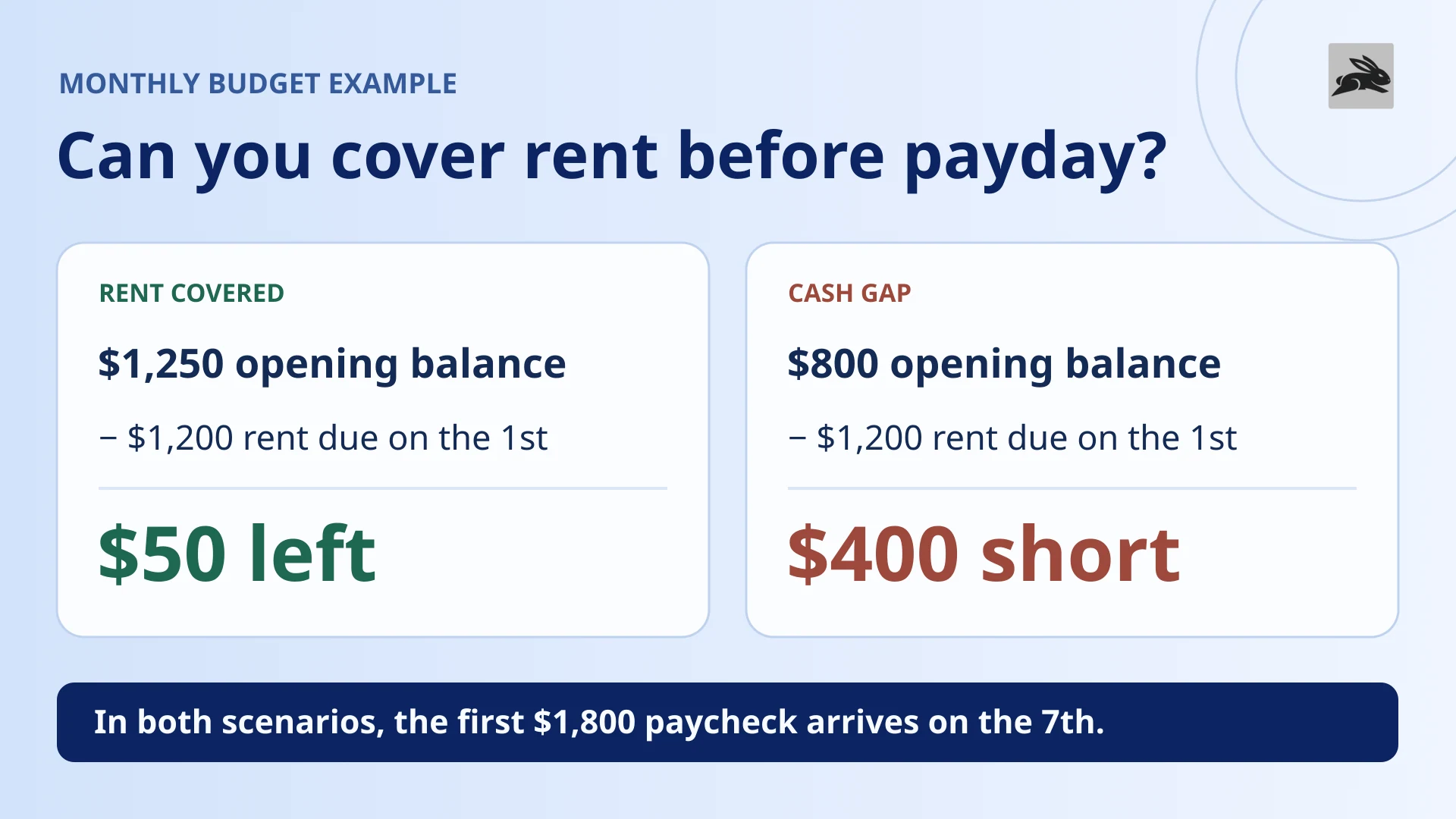
With $1,250 carried into the month, rent brings this household’s checking balance to $50 on the 1st. In the simplified calendar below, the next activity is the first paycheck on the 7th. On your own calendar, enter every outflow before the next deposit, including automatic payments.
| Date | Checking activity | Projected balance |
|---|---|---|
| Start | Opening balance from last month | $1,250 |
| 1st | Pay rent − $1,200 | $50 |
| 7th | Paycheck + $1,800 | $1,850 |
| 7th–20th | Other outflows − $1,250 | $600 |
| 21st | Paycheck + $1,800 | $2,400 |
| 21st–end | Remaining outflows − $1,070 | $1,330 |
With only $800 to start, the same rent due date creates a projected $400 shortfall. If that happens in your calendar, check whether you can carry more cash from the prior month or ask a biller about changing a due date. Confirm when a change would take effect. If your monthly plan is short even after trimming optional spending, start by identifying essential bills and payments you could miss, then contact the relevant providers early about available options.
For a plan maintained by several people, compare household budgeting apps and test shared purchases, member permissions, and annual bills before importing all your records.
Monthly budget template
Free Monthly Budget Template
Two fillable pages for your monthly plan, actual spending, paydays, and bills. Type directly in the PDF or print a blank copy.
Download the budget template (PDF)Month ____________________ Checking balance at the start of the month $____________
Duplicate the template and calendar each month. Add rows for individual bills or categories. Fill in the Plan column before the month starts and the Actual column as income and spending come in. Use a separate line for savings contributions and money earmarked for future bills.
| Income, expenses, and set-asides | Plan | Actual |
|---|---|---|
| Paychecks after deductions | ||
| Other income | ||
| Total take-home income | ||
| Housing and utilities | ||
| Groceries and household expenses | ||
| Transportation and insurance | ||
| Medical, care, or other essential costs | ||
| Required debt payments | ||
| Optional spending | ||
| Predictable nonmonthly bills | ||
| Emergency savings or other goals | ||
| Extra debt payment | ||
| Total spending and set-asides | ||
| Income left after the plan |
Subtract total spending and set-asides from total take-home income in each column. At month-end, compare your planned and actual amounts. Check how much was left against what you expected. If the two amounts differ, look for a missing transaction, an expense recorded twice, or income that arrived in another month.
Next month’s adjustment
The category or bill I’ll change _______________________________________________________
What I’ll change and when __________________________________________________________
Amount I expect to carry forward in checking $___________________
If a budget category comes in below plan, decide whether you still need that money. A lower electricity bill may leave cash you can reassign. A car registration bill that moved to next month still needs a line in the next budget or money waiting in its sinking fund.
Put renewal deadlines on the bill calendar as well as payment dates. Our subscription tracker comparison explains the difference between finding charges, receiving reminders, and getting cancellation help.
Payday and bill calendar
Checking balance at the start of this period $___________________
Begin with the opening checking balance. List transactions in date order and carry the projected balance from each row to the next. If a balance falls below zero, note the amount you need and the date you need it by.
| Date | Payday, bill, or transfer | Money in | Money out | Balance |
|---|---|---|---|---|
Lowest projected balance $____________ Date _______________
If that balance is below zero, write the amount you need to cover and what you will do before the bill comes due. Recheck the dates or amounts if a paycheck or bill changes.
Amount to cover $____________ Action by __________________
My next step ______________________________________________________________________
Sources
Consumer.gov’s guide to making a budget
CFPB’s spending assessment
CFPB’s bill calendar and cash-flow budget tools










Comments 7