


To track financial goals, write down the target amount, deadline, and money you’ve already set aside. Divide the amount still needed by the number of contributions left. At each payday or month-end, compare your actual progress with where you planned to be. If you’re behind, calculate what you need to contribute from now on before deciding whether to change the amount, the deadline, or both.
A spreadsheet is enough for a few goals. YNAB is useful if you want to budget for a goal before you spend, Monarch if you want one dashboard for savings and debt, and Ally Savings Buckets if you want to separate cash for several goals within one savings account.


Give each goal a dollar amount and a deadline
Start with one goal you can write in a sentence. “Save $2,400 for a move by the end of June” gives you a clear finish line. Include only money already reserved for the move in your starting balance. If one account holds rent money, moving savings, and a cash emergency fund, give each dollar one job when you create the tracker.
Check the real payment dates before choosing a deadline. A June move can require a deposit in May, and that deposit may come due before your next paycheck. Split the goal into milestones if you’ll pay in stages. For a car repair due once, a single target and a sinking fund may be enough. For a seasonal goal, our holiday budget example shows how to protect regular bills while setting a spending limit.
The CFPB’s goal-planning worksheet compares the amount you need to save with what your budget can support. To find that number, start with take-home pay and deduct essentials, minimum debt payments, and existing commitments. If two goals need $500 a month and you can spare $350, choose which deadline or target amount can move before setting up transfers. Use the monthly budget worksheet and payday calendar to see what you can set aside before the next bill is due.
Calculate the pace you need to hit
For a cash goal, subtract what you’ve already saved from the target, then divide by the number of deposits you can make before the money is due. Count actual paydays if you’ll contribute each time you’re paid. Round up to a useful transfer amount and treat interest as extra unless you’ve explicitly built it into your projection.
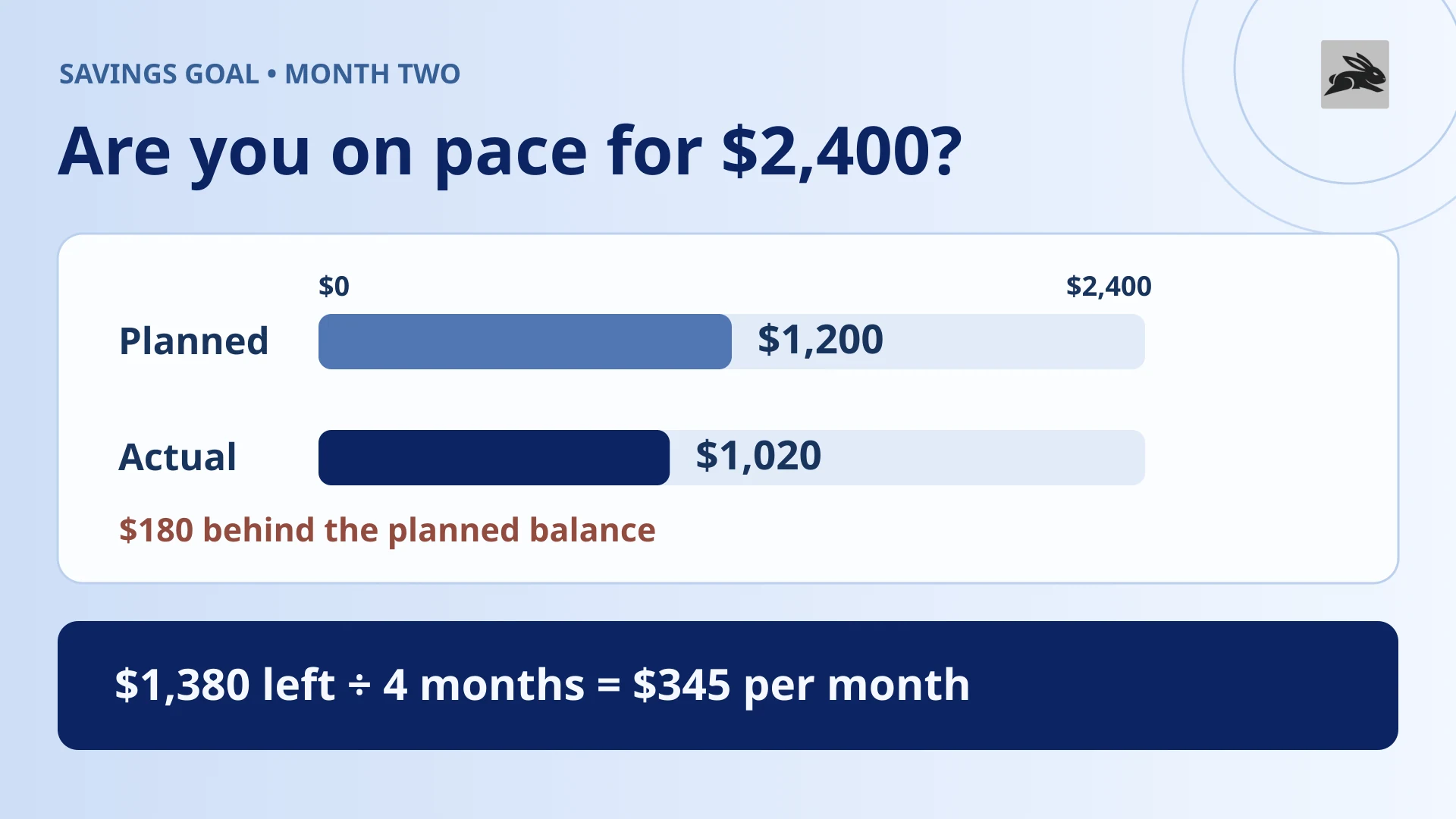
Say you want $2,400 for a move in six months and have $600 earmarked. You need $1,800 more, or $300 per month. After two months, your planned balance is $1,200. You’ve deposited $480 and pulled $60 back out, so your actual balance is $1,020. That’s 42.5% funded and $180 behind the plan.
Choose what to change when you fall behind
With $1,380 left to save and four deposits remaining, the new amount is $345 per month. If $320 is the most your budget can support, four transfers would put you at $2,300. A firm deadline calls for finding the remaining $100, reducing the moving costs by that amount, or splitting the expenses if their due dates allow.
If you can wait one extra month, five contributions of $276 would close the $1,380 gap. Write down the decision so the next check-in uses the revised plan. Keep the original target and last month’s actual balance visible so you can see what changed.
When your income varies, compare the target with your likely slower months. A pace based on your highest-earning month can leave you short when hours drop. You can plan a smaller regular deposit and make extra deposits in stronger months. Check whether you’ll still have enough by the date the money is due.
Match the progress number to the kind of goal
| Goal type | What to record | How to read it |
|---|---|---|
| Cash savings | Balance reserved for this goal and net contributions | Balance ÷ target shows progress. Compare the balance with the plan for today. |
| Debt payoff | Statement balance, payments, interest, and new charges | Use the drop in balance to measure progress. Check separately whether you made the planned payment. |
| Long-term investing | Your contributions and current account value | Compare contributions with your plan. Review value on its own because markets move. |
Suppose a credit card starts at $5,000. You pay $1,000, and $120 of interest and $80 of new purchases post. The balance drops to $4,200, so the debt falls by $800, or 16% of the starting balance. The $1,000 payment still matters for cash flow. If the balance falls slower than expected, look at what posted before changing your payment plan. If you need a payment order, see the worked example of a smallest-balance-first debt payoff.
For a long-term investing goal, the account value can drop even when you contribute on schedule. Tracking both figures helps you see whether you kept up with contributions before reviewing your longer-term assumptions. If the goal is a cash bill due in a few months, a balance reserved for that bill gives you a simpler progress measure.
For a retirement goal, our Roth IRA setup guide explains how to check eligibility and verify that scheduled deposits become investments.
Copy this financial goal tracker
Make one row per goal and save a fresh copy at each month-end. In the planned balance column, enter where you expected to be on the review date. Use negative values for a savings shortfall. For a payoff goal, enter your actual balance minus the planned balance separately and label a positive result as extra debt remaining.
| Goal and deadline | Target | Planned now | Actual now | Gap and next step |
|---|---|---|---|---|
| Move by June 30 | $2,400 | $1,200 | $1,020 | −$180. Check if $345 per month fits. |
Add a line for contributions and withdrawals if you keep dipping into the same savings. Lower net deposits could mean the transfer is too ambitious or that another expense needs its own budget line. In a shared budget, agree on who logs each transfer and which balance both people will use.
If several household members will contribute to the same goals, compare household budgeting apps for shared access, contribution tracking, and privacy before connecting personal accounts.
Compare apps for tracking financial goals
Pick the tool that makes your next decision easier. The comparison uses published US prices and product documentation. It focuses on what each option lets you track and the effort it takes to keep the numbers current.
| Tool | Best fit | US cost | What you’ll need to do |
|---|---|---|---|
| Spreadsheet | A few goals and full control over the math | $0 with a free sheet | Update balances and remaining contributions yourself. |
| YNAB | Funding goal categories in the monthly budget | $109/year or $14.99/month | Assign available dollars to the categories you intend to fund. |
| Monarch Core | Monitoring savings and debt in one place | $99.99/year | Set up savings allocations and confirm liability details for payoff estimates. |
| Ally Savings Buckets | Separating savings goals inside one bank account | No monthly maintenance fee for Ally Savings | Use an Ally Savings Account and assign its cash to buckets. |
YNAB for deciding what to fund next
Set up a category and target for the move. Each payday, assign part of the cash you have to that category. If you need to move money out to cover a different expense, check what’s still available and what the target calls for. YNAB suits a household that wants the goal to guide everyday spending decisions. Expect to spend time assigning money and reviewing categories.
Monarch for monitoring savings and debt together
Save up goals can use a target amount, date, and planned monthly contribution to show whether you’re on pace. Pay down uses liability accounts and can project a payoff using the APR, minimum payment, and planned payment you enter. Verify those inputs against the lender’s statement. If the rate or planned payment changes, revisit the projection. IncomeBunny’s YNAB vs Monarch comparison covers the broader budgeting workflow.
Ally Savings Buckets for keeping cash goals separate
Ally lets you divide money in a single Savings Account into buckets. You could create one for moving costs and another for annual car expenses, then check each bucket’s balance against your target. This works best if your goals live in that account. Keep an outside ledger or choose a broader dashboard if you want to see debts and balances at other institutions together. If you are comparing banks for a cash goal, check the APY, fees and access rules for high-yield savings accounts.
When the goal is shared with a partner, compare couples budgeting apps and agree who can see each account, who records purchases, and how you will settle shared costs.
Try one goal before moving your whole plan

Set up one goal with an amount and a due date. Enter a contribution, then subtract a withdrawal and see what the tool reports. Compare the displayed balance with your bank or lender before relying on it. If you link accounts, check whether your institution is supported and whether you can fix a missing transaction or enter a correction manually.
Try the same move example in any option you’re considering. After contributing $480 and withdrawing $60 from a starting balance of $600, can you see $1,020 reserved? Can you tell that you need $345 a month for four more months? A bank bucket might need a separate calculation. A budgeting app might help you see which other category you could reduce to find an extra $25 a month above a $320 limit. If you want to try category tracking before paying for a subscription, compare free budgeting apps with spending categories.
Keep your monthly review short
Put a recurring 15-minute check-in on your calendar after your last expected deposit posts. Update balances, compare them with planned milestones, and recalculate any goal whose balance or date changed. Before you finish, choose one action with a date. It might be scheduling the next transfer, checking when a deposit is due, or adjusting two goals that compete for the same dollars.
For a goal due before the next check-in, use the last payday before the bill is due. Confirm that the cash can actually reach the account or payee in time. When a goal is complete, decide where the recurring contribution should go next so it has a place in next month’s budget.
Sources
CFPB’s money goal planning worksheet
YNAB pricing and goal features
Monarch pricing and Monarch’s guide to savings and debt goals
Ally Bank’s Savings Account and buckets










Comments 3