


Start with QuickBooks Online Plus if you run a small contracting business and mainly need job profitability and estimate-based progress invoices. Add Knowify if you already use QuickBooks and regularly submit construction pay applications. Compare FOUNDATION and Sage 100 Contractor if you want job costing, construction billing, and specialized payroll in the accounting system. Shortlist Sage Intacct Construction when multiple entities and consolidated reporting drive the purchase.
The right choice depends on the hardest job you bill. A residential remodeler with three milestone invoices can get by with a simpler setup than a commercial subcontractor that has to reconcile retainage, submit certified payroll, and explain a work-in-progress schedule at month-end.


What makes construction accounting software different?
A company-wide profit and loss statement can look healthy while one job is losing money. Construction accounting ties time, materials, equipment, and subcontractor costs to a project and, where supported, to a phase or cost code. It also helps finance teams see how much work has been earned, how much has been billed, and how much cash has arrived.
List the outputs your contracts actually require. A service electrician might only need labor and materials by job. A subcontractor billing a general contractor might need a schedule of values, retainage, and a pay application every month. A builder financing several entities may also need a consolidated view across companies. For the general ledger, bank feeds, and access controls common to these setups, see our cloud-based accounting software comparison.
Bring a redacted invoice, pay application, and job-cost report to vendor demos. Those documents show whether the advertised feature can handle the format and detail your customer or controller expects.
An independent designer or consultant who only needs standard client invoices can also compare invoicing software for freelance work. If the contract requires retainage, a formal pay application, or WIP reporting, test those construction requirements separately.
Construction accounting software compared
Prices below are regular U.S. software rates where shown, checked in November 2026. Ask for the same scope from each vendor, including users, payroll, modules, implementation, and data migration.
| Software | Where to shortlist it | Cost or scope to verify |
|---|---|---|
| QuickBooks Online Plus | Small contractors with simple job costing and estimate-based progress invoices. | $140/month at regular price. Check how you would track retainage and WIP. |
| Knowify + QuickBooks Online | Trade contractors that want to keep QuickBooks and add pay applications. | Knowify Core $149/month plus QuickBooks. Check the tier and seats. |
| FOUNDATION | Contractors that need construction payroll, job cost, and billing in the ledger. | Request a quote with payroll, field time, and billing modules itemized. |
| Sage 100 Contractor | Contractors moving to construction accounting with job cost, billing, and payroll. | Request a quote for software, hosting if needed, and implementation. |
| Sage Intacct Construction | Companies that need multi-entity close and consolidated project reporting. | Request a quote for entities, construction modules, and payroll integration. |
QuickBooks Online Plus for simpler jobs
Intuit’s Projects feature tracks income and costs by project on Plus and Advanced. Progress invoicing lets you bill parts of an estimate as work moves forward. That can cover a remodeler who bills at framing, rough-in, and completion. If your client requires a particular pay application or retainage release, ask for that exact workflow and check whether it needs a separate tool or spreadsheet. QuickBooks pricing and plans and Intuit’s progress invoicing guide. See which other tasks each QuickBooks tier can handle in our small business accounting software comparison.
Knowify with QuickBooks for construction pay applications
Knowify describes G702/G703 pay applications with retainage, stored materials, and change orders. Its Core plan is positioned for fixed-price and AIA billing. Advanced adds more project management and job costing and includes ten users, versus one in Core. At monthly rates, Core with QuickBooks Online Plus totals $289 before taxes, payroll, or extras. Keep QuickBooks as the ledger and ask the vendor to show which system creates the invoice and where credits, payments, and retainage releases appear after syncing. Knowify plans and AIA billing features.
Where an add-on can create extra work
For a two-system setup, give each action a home. Have the project manager approve a change in the job tool, have the bookkeeper post or receive the invoice in the ledger, then record a partial payment. Ask the vendor to reverse the payment and show how both balances recover. If you discover a mismatch, find out which system supplies the official receivables report and who gets alerted when the sync fails.
When a construction ledger is worth the switch
FOUNDATION for construction payroll and job costing
FOUNDATION puts job costing, invoicing, accounts payable, and payroll in one construction accounting system. It lists certified payroll reports and support for prevailing-wage and union workflows. Ask to see an employee work on two jobs at different rates in the same pay period, then trace wages and burdens back to the right job codes. One accountant who reported switching from QuickBooks to FOUNDATION said they were still learning the system after the move. Budget time for your own payroll and month-end parallel runs. FOUNDATION’s product overview and the accountant’s discussion.
Sage 100 Contractor for a construction-specific back office
Sage lists job cost reporting, AIA billing, certified payroll, and lien waiver workflows for Sage 100 Contractor. Its documentation also describes withholding receivable retention based on the rate in the job record. Compare it directly with FOUNDATION using the same pay application and payroll. Confirm who hosts the application, how people in the field enter time, and what the quote includes for setup and training. Sage 100 Contractor and retention documentation.
Sage Intacct Construction for multi-entity reporting
Sage describes multi-entity consolidation, job costing, and WIP reporting in Intacct Construction. Compare it when the finance team closes several entities or needs to report job results across them. Ask the vendor to post a shared cost, show how it appears in each company, and run a consolidated report. Get the payroll provider, time capture, and any required integration priced in writing. Sage Intacct Construction product brochure.

If you bid public work, check which payroll rules apply to the contract. For federally covered Davis-Bacon work, the contractor generally submits weekly payroll information. Use the Department of Labor’s certified payroll instructions to specify the report the vendor must show. Our construction wage guide provides market context for budgeting, while the applicable wage determination governs a covered job. If payroll runs in a separate system, use our small business payroll software comparison to evaluate filing coverage and ledger integration, and verify certified payroll separately.
Run a sample pay application and WIP close
Give each vendor the same fixed-price job. The original contract is $250,000. An approved change adds $20,000, making the revised contract $270,000. Keep a pending $12,000 change separate in this exercise. Assume $108,000 in costs to date and a $216,000 total cost forecast. The example uses a cost-to-cost estimate of progress and measures billings gross of retainage. CFMA’s WIP guide.
At month-end, the job is 50% complete by cost, so estimated earned revenue is $135,000. Assume gross billings total $120,000 after posting the current pay application. The job is $15,000 underbilled on that basis. That figure measures the gap between earned revenue and gross billing. It doesn’t tell you what the customer owes today.
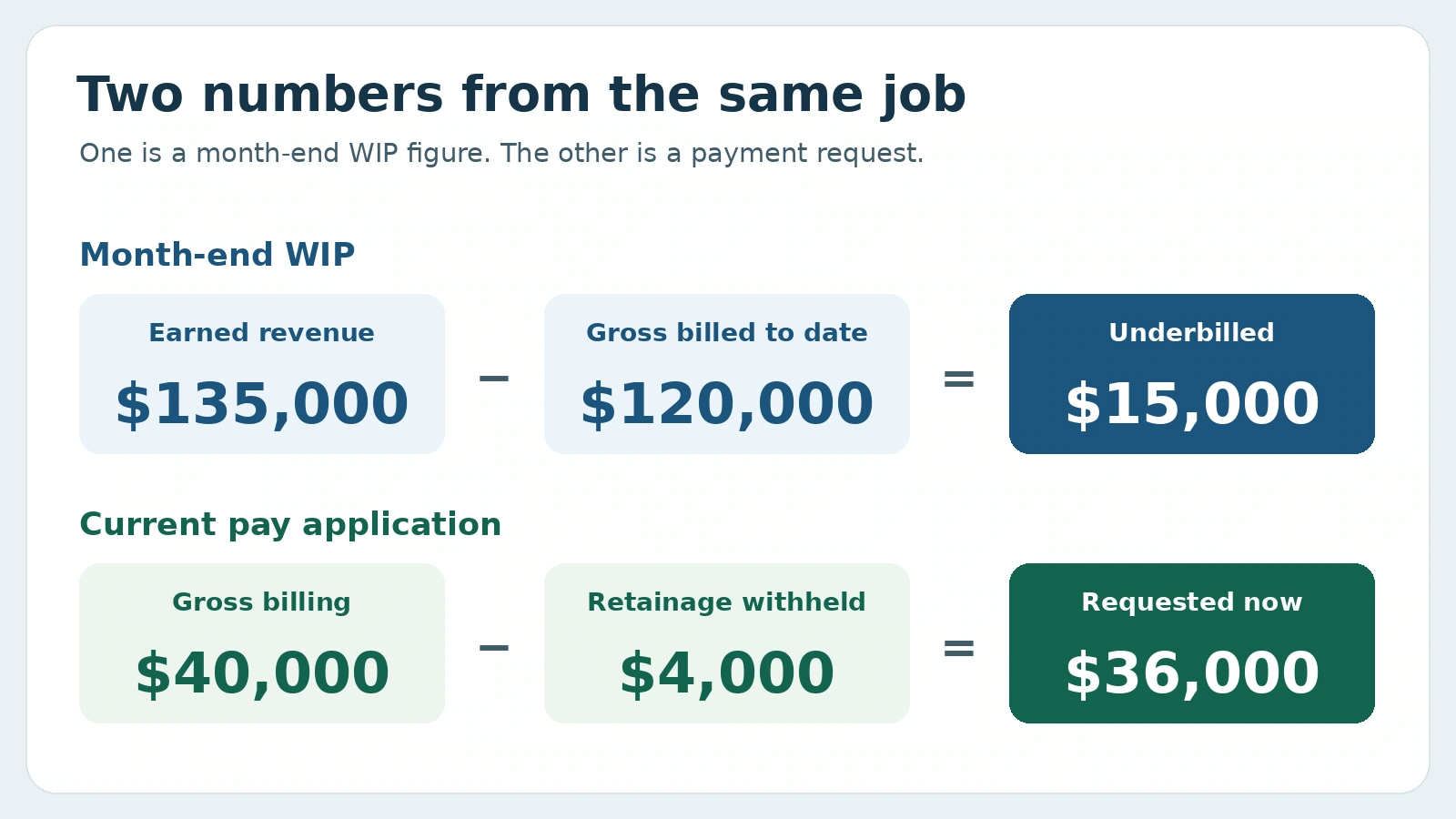
The current application bills $40,000 before withholding. At 10% retainage, this leaves $36,000 requested now and $4,000 held on this application. With $80,000 previously billed gross at the same rate, cumulative retainage is $12,000, assuming nothing has been released. The contract sets the actual rates, release terms, and required forms. AIA’s payment application instructions.
Change the cost forecast to $240,000 without changing costs incurred or billings. Estimated progress drops to 45%, earned revenue drops to $121,500, and underbilling falls to $1,500. Forecast job profit also drops from $54,000 to $30,000. Ask the vendor to refresh the WIP report and show the audit trail for the revised forecast. A smaller billing gap can accompany a less profitable job.
Check the cash separately
Assume the customer paid all $72,000 previously due, after withholding the earlier $8,000 of retainage. Ask the vendor to post a $20,000 partial payment against the current $36,000 request. The example should leave $16,000 of the current payment request outstanding and $12,000 still held as retainage. That exercise shows whether the system keeps payment status, retainage, and WIP distinct when the customer sends less cash than expected.
What to verify before signing a contract
Ask the project manager and bookkeeper to run the sample independently. Compare how many steps require entering the same data twice, how errors are flagged, and whether both people see the same numbers. A feature that needs a nightly sync or a spreadsheet export may still work if someone owns that handoff. When you find duplicate entry, apply the same approval and reconciliation checks from our guide to testing accounting automation.
| Demo task | What a satisfactory result looks like |
|---|---|
| Code field labor and a supplier bill | Both hit the right job and phase. A correction leaves a visible audit trail. |
| Post approved and pending changes | The revised contract and billing schedule reflect the approved change. The pending item stays separately visible. |
| Bill and release retainage | The new pay application ties to previous billing. Retainage stays identifiable until it can be released under the contract. |
| Close WIP and export reports | The detailed job schedule ties to the financial reports. The controller can export it and trace a figure back to source entries. |
| Run payroll and check permissions | Time routes to the right job and pay rules. The field role can submit time without access to payroll or the ledger. |
Include a reimbursable expense if your contracts allow it. Track the original vendor bill and its recovery on the client invoice so the project report shows both sides. Our billable expense income guide walks through that distinction.
Compare first-year cost and migration effort
Ask for a quote that separates setup, training, data migration, hosting, support, payroll, integrations, and recurring user fees. Compare it with what your current process costs in software and staff time. Check whether the vendor bills for every field worker or only for people with specific roles.
For a migration, test one open job before committing to the cutover date. Confirm that original and revised contract values, costs to date, committed costs, invoices, and retained balances reconcile between systems. Decide how much closed-job history to move and what you can keep as a searchable export. Then run the old and new reports for the same period before switching. Use the reconciled figures as inputs to your cash flow and financial model.












Comments 1