


Start with QuickBooks Online if your accountant already works in it, FreshBooks if you bill for client work, or Xero if several people need access. Consider Zoho Books if you need purchase orders and basic inventory on a lower subscription budget. Wave is a good starting point for a solo business that wants free invoicing and can handle bank imports manually.
Choose the plan that covers your busiest month and gives your bookkeeper the access and reports they need. A free plan can work well for a few transactions. If it means manually entering every sale or sending your accountant a spreadsheet each month, include that time when you compare it with a paid plan.

What your accounting software needs to handle
An invoice app can tell you who owes you money. Accounting software should also let you match what was invoiced, paid, and deposited, then produce reports your accountant can review. Start with your last full month and count invoices, supplier bills, bank accounts, card feeds, and people who need access. For seasonal businesses, do the same for a peak month.
Write down the tasks that would force an upgrade. A consultant might need to turn tracked hours and a client expense into an invoice. A retailer might need a return to put a sellable item back into stock and reverse its cost of goods sold. If you rely on a point-of-sale or ecommerce integration, identify which app will hold the authoritative inventory and whether the accounting system receives orders or summarized payouts. Contractors who bill by project milestone or hold retainage can use our construction accounting software comparison to test a sample pay application.
Ask your bookkeeper to name the reports they use at month-end. A profit and loss statement, balance sheet, and lists of unpaid invoices and bills are useful starting points. Request sample exports from the plan you’re considering if it takes time to get access.
Small business accounting software compared
Prices are regular U.S. monthly subscription rates checked in November 2026. Introductory offers, annual discounts, taxes, payroll, and payment processing are excluded. The plan in the last column is the one to evaluate for the use case shown.
| Software | Regular entry price | Plan and limit to check |
|---|---|---|
| QuickBooks Online | Free or Simple Start $38 | Plus $140 for inventory and project profitability. |
| Xero | Early $27 | Growing $59 if Early’s 20-invoice or five-bill cap is too low. |
| FreshBooks | Lite $23 | Plus $43 for accountant access and up to 50 billable clients. |
| Wave | Starter $0 | Pro $19 for automatic imports from supported banks. |
| Zoho Books | Free or Standard $20 | Professional $50 for inventory and purchase orders. |
QuickBooks Online for accountant-led bookkeeping
Simple Start is a paid option for one business user and up to two accountants. Essentials raises the business-user limit to three at $85 a month. Plus allows five business users and includes inventory tracking and project profitability. Ask your accountant whether they need to work directly in your ledger and which plan features they use during a close. If inventory is the reason for choosing Plus, simulate a product return in the trial before paying for the upgrade. QuickBooks Online plans.
Xero for shared access and supplier bills
Xero lists no per-user license fees. That makes Growing worth comparing if an owner, an office manager, and an outside bookkeeper each need access. Early includes bank reconciliation, but the 20-invoice limit applies to approvals and sending, and transactions created by connected apps may count. A business with 18 invoices and eight bills in a typical month already exceeds Early’s five-bill limit. Moving from Early to Growing adds $384 a year at regular monthly rates. Established is $97 a month if you need features such as multiple currencies. Xero U.S. plans.
Zoho Books for purchase orders and basic inventory
Professional includes purchase and sales orders, inventory tracking, and project profitability. At $50 monthly, it costs $90 less per month than QuickBooks Plus before integrations. Compare the actual stock workflow before treating those plans as interchangeable. Test purchase receipts, sales, returns, and adjustments. If you use a separate inventory app, check whether its integration adds a subscription or pushes you to a different tier. Zoho Books U.S. plans.
Use separate logins to test who can do what
Decide who will send invoices, who will enter bills, and who can approve a payment. The fact that a plan includes three users tells you how many people can log in. It tells you little about what they can see or change. Ask the owner and the bookkeeper to sign in separately during the trial. If your assistant can see payroll or change a bank connection when they only need to send invoices, check whether the plan has a narrower role.
Accounting software for service businesses and solo owners
For a solo service business that mainly needs billing, our best invoicing software for freelancers guide compares dedicated invoice tools with accounting-linked options, using client limits and total payment costs.
FreshBooks for turning hours into invoices
FreshBooks fits service businesses that want time tracking, expenses, and client billing in one workflow. Lite allows up to five billable clients. Plus raises that to 50 and adds accountant access and double-entry accounting reports. Premium raises the limit to unlimited clients and adds project profitability reporting. A consultant with four clients who needs a bookkeeper to log in should price Plus. An agency with 52 billable clients should price Premium at $70 a month, then check the cost of extra team members. FreshBooks plans and client limits. For a closer look at the billing and reporting differences, see how FreshBooks and QuickBooks compare.
During the trial, log two hours and attach a receipt to a client project. Create the invoice, check how the original expense and its reimbursement appear, and make sure someone can follow the transaction from the receipt to the payment. The distinction matters when you track billable expense income.
Wave for free invoicing and basic bookkeeping
Starter includes unlimited invoices, estimates, bills, and bookkeeping records. Pro adds automated imports from supported banks and receipt capture. Check the feeds for your exact institutions, including your credit card. If you have one account and a handful of transactions, manual entry or importing a statement may be enough. PCMag’s independent comparison selected Wave for microbusinesses and FreshBooks for service businesses. Wave plans and PCMag’s comparison, republished by Yahoo.
Can free accounting software cover your business?
Compare the limits that affect your workflow. QuickBooks Free includes one connected bank account, no accountant access, and two invoices per month unless you qualify for and enable QuickBooks Payments. Zoho Books Free allows one user plus one accountant, with a $50,000 financial-year revenue threshold and up to 1,000 invoices per year. Zoho lists connected bank feeds on Standard. Wave Starter suits higher invoice counts when you can handle the books yourself. Payment processing can cost extra on free plans, so compare the fees on the payment methods customers actually use. Our comparison of free bookkeeping plans breaks down bank feeds, user access, and what you can export.
How to check inventory with a sample return
Use a $25 item that sold for $60. For a full refund on a sellable return, check that sales fall by $60, one unit returns to stock, and the $25 cost of goods sold reverses. If the item is damaged, check how you would record the write-off. Test this in both the sales channel and the ledger if they sync.

How to compare the real cost of accounting software
Multiply the regular monthly price by 12. Add payroll, extra users, connectors, payment fees, and any bookkeeping time. Separate recurring costs from setup and migration. Treat card fees and other variable expenses as volume-dependent. If you process $10,000 by card each month, a difference of 0.3 percentage points alone costs $30 a month, before any fixed fee per transaction. Compare small business payroll plans by the states you file in and how the pay run reaches your ledger.
Take Wave Starter versus Pro. At $19 a month, Pro costs $228 a year at the monthly rate. If your time is worth $40 an hour, it needs to save about 29 minutes per month to cover the subscription difference on time alone. Saving 15 minutes each week is about 13 hours or $520 over 52 weeks. Test the import and matching workflow before counting those savings. A feed that imports transactions but still takes the same time to review may change the result.
If your main problem is collecting receipts before they reach the books, compare expense tracker and receipt apps. Confirm that exports and integrations fit the ledger you already use.
Run one month-end close before you subscribe
Use a demo company or anonymized sample data, and compare the same transactions in both finalists. Start with one invoice payment, one bill, one refund or credit, and one transfer between your own accounts. Import a short bank statement and see how many entries require manual work. If you sell products, include an inventory purchase and a return. If those transactions expose repeated manual work, see which accounting automation tools can handle bank matches, receipt capture, and approvals.
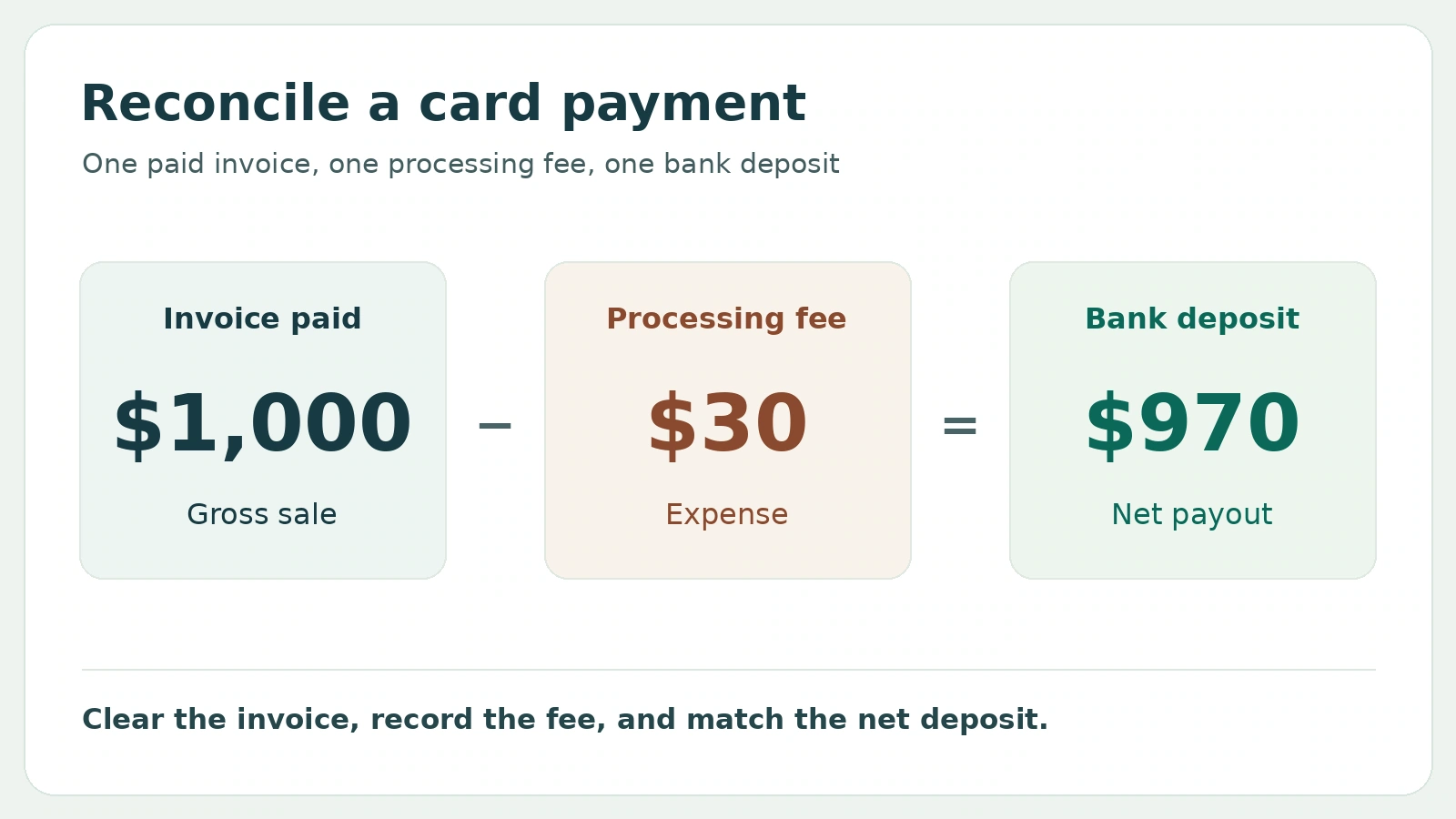
For the payment above, confirm the invoice is marked paid, the gross sale still shows as $1,000, and the bank deposit reconciles at $970. The $30 is a processing expense in this simplified example. Look for a duplicate sale if the deposit was imported after the invoice payment was recorded.
Export your profit and loss statement, balance sheet, and transaction detail. Check what your accountant can open, what each team role can edit, and whether you can retrieve invoices and attachments. If you use the numbers to plan hiring or financing, make sure the export feeds your financial model.
Switch after a clean close
Pick a cutover date after reconciling the old books. Confirm opening balances, outstanding invoices and bills, and inventory quantities and values before connecting bank feeds in the new system. If you import unpaid invoices individually, have your bookkeeper check that they are counted once in opening receivables. Keep your old reports, transaction exports, and source documents accessible. The IRS recordkeeping guidance explains what records should support income and expenses.











Comments 3