


For a small business that wants payroll tax filings handled, start with Patriot Full Service for a low-cost, single-state team, OnPay for a team spread across several states, or Square Payroll if you already use Square for shifts and tips. Gusto makes sense when you also want employee onboarding and benefits administration. QuickBooks is worth a look when you want payroll and bookkeeping in the same system.
Match each plan to the people you pay and the filings you need. A $37 base price can turn into a different bill once you add states or time tracking. The comparison below uses regular US prices checked November 11, 2026. The six-employee examples exclude promotions, subscription taxes, optional add-ons, wages, and employer payroll taxes.

| Provider and plan | Regular monthly price | Six employees | Start here if… |
|---|---|---|---|
| Patriot Full Service | $37 + $5 per worker paid | $67 | You want low-cost tax filing in one state. |
| OnPay | $49 + $6 per person | $85 | Your team works across several states. |
| Gusto Simple | $49 + $6 per person | $85 | You want onboarding and benefits in one state. |
| Square Payroll | $35 + $6 per person paid | $71 | Your team already clocks in through Square. |
| QuickBooks Workforce Payroll + Simple Start | $88 + $6.50 per employee | $127 | You want a payroll and bookkeeping bundle. |
Payroll services for tax filing and employee onboarding
Full-service payroll generally includes calculating pay, withholding taxes, and sending specified tax deposits and returns. Get the list of covered filings for your business. The term “full service” leaves room for differences in local coverage and responsibilities during a switch.
Patriot Full Service for a low single-state cost
Patriot Full Service includes payroll tax deposits and filings for one state. Each additional state adds $12 a month. At six paid workers, one state costs $67, two cost $79, and three cost $91. Confirm local coverage against the work and residence addresses in your roster. Patriot publishes the tax jurisdictions it supports, which is more useful for this check than a promise of nationwide availability. Patriot’s pricing and filing coverage.
Patriot Basic is $17 a month plus $4 per worker paid. It calculates payroll taxes, while your business handles tax deposits and filings. At six workers the subscription is $41, so outsourcing those filings through Full Service costs another $26 a month for one state. Time & Attendance is separate. Six employees using timecards add $18 a month to either plan. Patriot’s plan and add-on prices.
OnPay for a team spread across states
OnPay lists one base price for payroll, with tax filings and payments in all 50 states included. Its $49 base plus $6 per person is easy to model when you expect to hire in another state. Ask about the exact local tax jurisdictions and any registration work before you hire. Filing an ongoing return and opening a new state tax account are separate tasks.
For seasonal staff and contractors, check how OnPay counts a billable person. Including someone on a pay run can trigger the monthly fee even when their pay on that run is $0. Workers can access digital year-end forms, while OnPay lists a separate fee to mail forms. OnPay’s pricing and billing rules.
Gusto for onboarding and benefits administration
Gusto Simple combines single-state payroll and tax filing with onboarding and access to benefits administration. It’s a sensible shortlist pick when a new hire needs to finish paperwork, get set up for direct deposit, and enroll in benefits through the same system. Ask which benefits you can offer in your state and get a separate estimate for premiums and any administration charges that apply to your setup.
Gusto lists multistate payroll on Plus at $80 a month plus $12 per person. Plus also adds features such as time tracking and scheduling. At six workers, the move from Simple to Plus increases the subscription from $85 to $152 per month. The extra cost is easier to justify when the team would use several of those features. Gusto’s current plan comparison.
Payroll services that fit your existing software
Square Payroll for teams using Square for shifts and tips
Square’s full-service plan costs $35 a month plus $6 for each person paid. For a café or shop that already uses Square, the decision often comes down to how hours and tips reach the pay run. Square documents how to import eligible tips, including credit card tips, using the appropriate settings. Check the import using one busy shift with tips and an edited timecard. Square’s payroll prices and tip-import instructions.

Square supports employees at work locations in different tax jurisdictions, with a limit that matters for mobile crews. Square says it does not support paying one employee who works in multiple tax jurisdictions. Check this before choosing it for crews that cross a city or state boundary during a pay period. Square’s guidance on multiple tax jurisdictions.
QuickBooks Workforce Payroll for a shared bookkeeping workflow
Intuit lists Workforce Payroll with Simple Start at a regular $88 per month plus $6.50 per employee. The $127 example includes the accounting subscription, so compare it with what you would pay for payroll and accounting separately. If you already subscribe to QuickBooks Online, get the incremental payroll price for your current account before comparing the numbers. Intuit’s payroll and accounting bundle prices.
During a demo, ask your bookkeeper to trace one pay run into the general ledger. Look at wages, employer payroll taxes, and liabilities, and check how the bank withdrawals will be matched. If you’re choosing the ledger at the same time, see our cloud accounting comparison and FreshBooks versus QuickBooks comparison.
What payroll costs when the same team hires across state lines
Suppose six employees start in one state. Later, two relocate, giving the business filing obligations in three states. Headcount stays at six, and each employee works in one state. The comparison assumes that all three vendors cover the jurisdictions and that the employer has the required accounts in place.
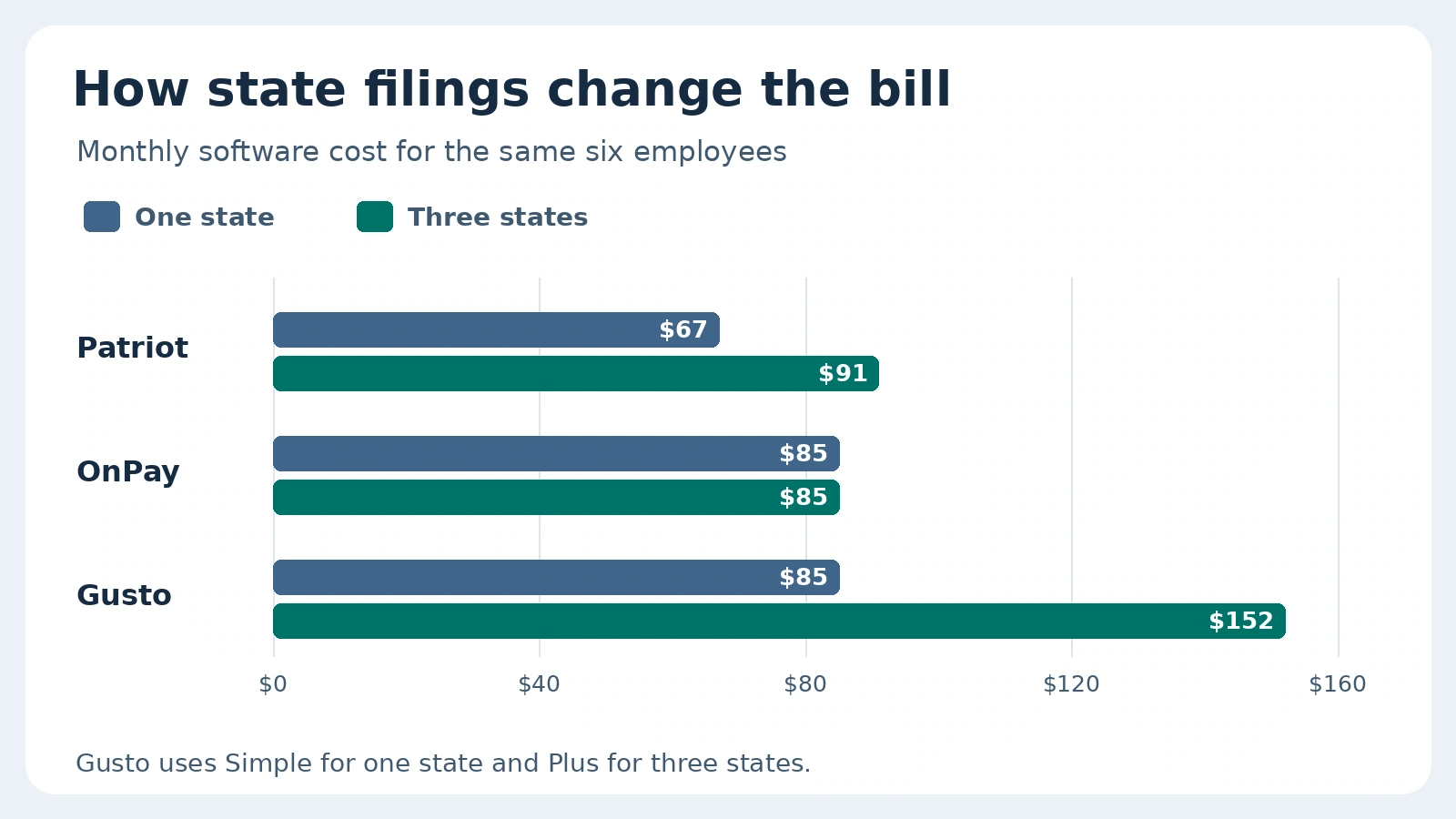
Patriot is $18 a month less than OnPay in one state. OnPay costs $6 a month less in three states, saving $72 over a full year at that headcount. Gusto Plus costs $67 more per month than OnPay in the three-state scenario. Compare what you would actually use on Plus, including time tracking and scheduling, with the cost of buying those tools separately.
What if everyone you pay is a contractor?
Square’s contractor-only plan has no monthly base fee and costs $6 per person paid. Paying four contractors in a month would cost $24. Recalculate the bill as soon as you expect to pay a W-2 employee, since that plan is for contractor payments only. Worker classification depends on the actual working relationship. The IRS guidance on employees and independent contractors explains the factors used for federal employment tax purposes.
Which fees should you get in writing?
Ask for a normal monthly invoice estimate and a separate setup estimate. List every work location, the number of employees and contractors, and the tools you want included. Ask how the vendor charges for state registrations, extra payroll runs, mailed year-end forms, corrections, and timekeeping. If you pay seasonal staff, ask how inactive workers are counted and what the base fee looks like during a month without pay runs.
How to test payroll software before switching
Use the same sample pay period with each provider. Give the sales or implementation team anonymized examples of the work your business actually does. Include one situation that usually takes extra effort, such as an adjusted timesheet, an employee in a second state, a bonus, or a deduction that changed midmonth.
Confirm filing coverage and the first payday
Send the provider your list of states and local jurisdictions. Ask who registers each new tax account, which returns the provider files, and when payroll has to be approved for money to reach employees on time. Confirm which tasks sit with the employer, particularly if a tax notice arrives or an older return needs an amendment.
Reconcile a draft pay run and the accounting entries
Compare the draft register with your source timesheets and pay rates. Check gross pay, deductions, employee withholding, employer taxes, and net pay. Ask for the total funding amount and the date it would leave the bank. Find out whether net pay, tax funding, and service fees appear as separate withdrawals, so you know what to match at month-end. Our small business accounting software guide covers how to evaluate the ledger alongside payroll.
Assign responsibility for the handoff
If you switch midyear, get year-to-date payroll registers and prior filing confirmations from the old provider. Ask both providers to confirm in writing who will handle the current quarter, any outstanding deposits, and year-end forms. Reconcile the imported year-to-date balances before the first live run so that pay and taxes already processed are reflected correctly.
For a typical payroll service provider arrangement, the employer generally remains responsible for federal employment tax obligations. Keep access to filing and payment records. The IRS recommends keeping the employer’s own address on record and using the Electronic Federal Tax Payment System to monitor deposits. IRS guidance on outsourcing payroll duties.
Choose the plan that handled your hardest sample pay run and gave you clear answers on filings and payday cutoffs. A few dollars of monthly savings matter less if the missing feature leaves you manually fixing the same problem each pay period.












Comments 2