

Start with MileIQ if you want automatic tracking and drive 40 or fewer trips a month. Pick TripLog Basic if you drive more often and can work with its free reporting limits. Choose Everlance if you want mileage and expenses together, Driversnote if you want a Bluetooth trigger in your car, or Stride if you prefer to start tracking yourself and export a free tax report.
Mileage tracker app comparison
These iPhone and Android apps are compared using US vendor plan details checked in November 2026. The most important distinction is whether the free plan limits the trips you can record or the trips you can export. If you deliver for DoorDash, pair your trip log with the DoorDash cost-per-mile calculator to estimate what each shift costs you in fuel.

| App | Free plan | First paid option |
|---|---|---|
| MileIQ | 40 automatic drives per month | Unlimited · $13.99/month |
| TripLog | Unlimited auto tracking, limited reporting | Premium · $59.99/year |
| Everlance | 30 auto trips per month plus manual entries | Starter · $10.99/month or $89.99/year |
| Driversnote | Automatic tracking with reporting for up to 15 trips per month | Pro · $11/month |
| Stride | Free GPS tracking you start yourself and a tax report | Free mileage tracking |
Count individual drives before choosing a capped plan. Two separately logged drives on each of 22 workdays add up to 44 trips, even before errands or other stops.
Which mileage app fits how you drive?
MileIQ for quick business and personal sorting
MileIQ logs drives in the background and lets you sort them with a swipe. Its US report builder offers PDF and CSV and can filter by date, vehicle and drive type. Pick it when reviewing a batch of trips matters more to you than logging receipts in the same app. MileIQ plans and US report options.
TripLog for high mileage on a free plan
TripLog Basic records unlimited automatic trips. Basic can email the last seven days from the mobile app. A seven-day Premium pass, available once per calendar year, lets you export an annual report. If you need a full report every month, compare Premium or another app with longer export periods. TripLog Basic and Premium pass and pricing.
Everlance for mileage and expenses in one place
Everlance Basic offers CSV exports for trips and transactions. You can add trips manually after reaching its automatic limit. Starter adds unlimited automatic detection and export options such as PDF and Excel. Everlance plans and export options.
Driversnote vs. Stride for different tracking habits
Driversnote can detect trips using phone motion or an optional in-car iBeacon and offers PDF and Excel reports. Its annual web subscription includes the iBeacon, which needs your phone nearby. Stride’s help center says to tap Track Miles to begin recording. On iPhone, reminders can prompt you to start. Stride also lets you request a report for a custom period. Driversnote plans, Stride trip tracking and Stride reports.

How to track business mileage for taxes
Log the date, destination, miles and business purpose for each work trip, and keep the vehicle’s total mileage for the year. Add the purpose while the trip is fresh. Ordinary driving between home and a regular workplace generally counts as commuting. Keep those trips separate, even when the app records them automatically. IRS car expense and recordkeeping guidance.
Check both 2026 mileage rates in your export
For eligible US business mileage under the standard mileage method, the IRS rate was 72.5 cents per mile from January through June and 76 cents from July through December. Compare your report with both periods. If the app applies a single rate to the entire year, export each half separately and calculate the two amounts. IRS standard mileage rates.
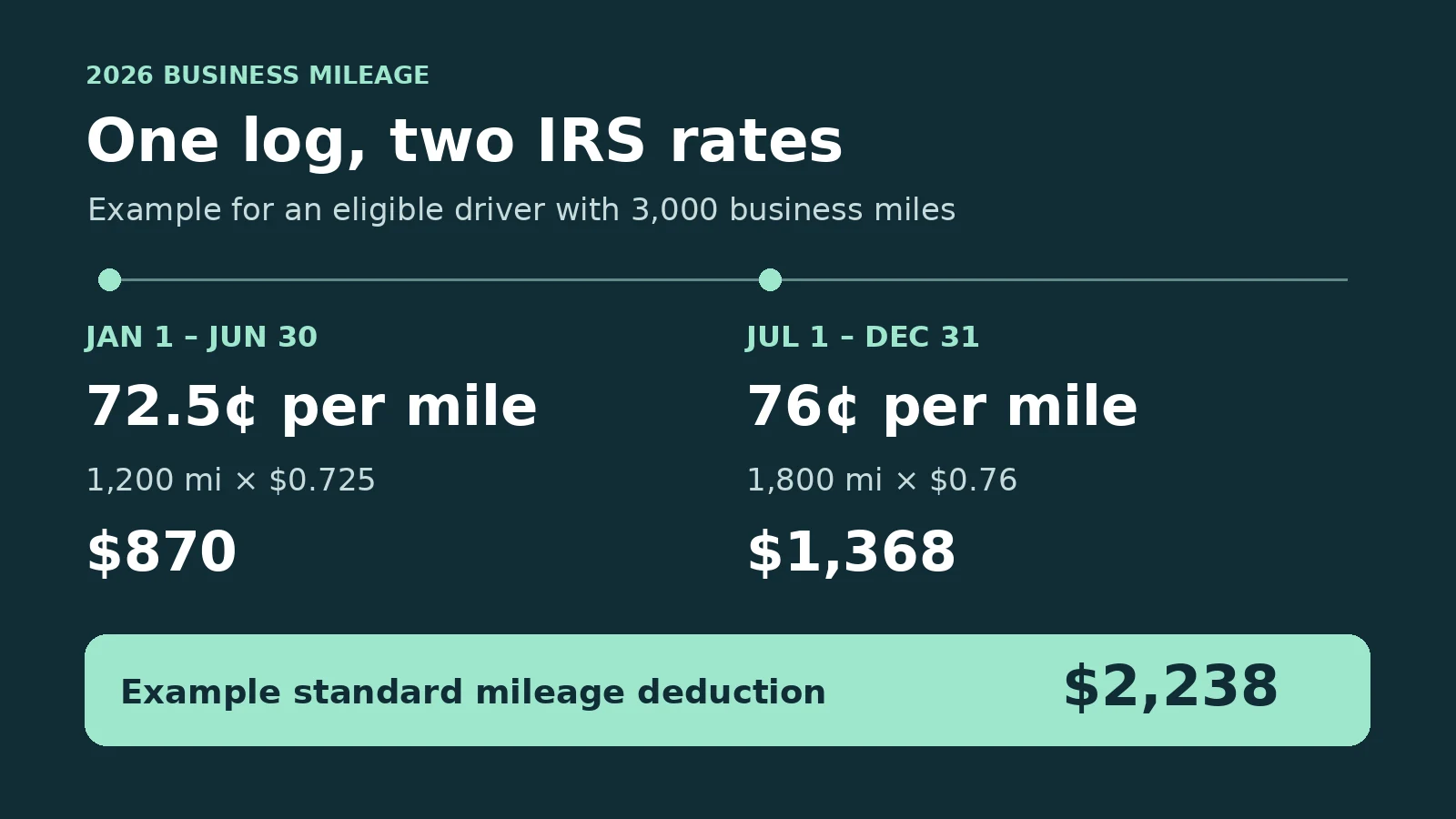
Applying 76 cents to all 3,000 miles would give $2,280, overstating this example by $42. The $2,238 represents a deduction. The effect on your tax bill depends on your situation. If you also track fuel and other variable driving costs for budgeting, keep that cash-spending total separate.
If you also collect work receipts, compare expense tracking apps with scanning and exports. Mileage records and reimbursement reports may need different fields, so test both outputs.
Run a one-week tracking and export check
Record the odometer at the start and end of the week. Include a short work trip, a trip with multiple stops and a personal drive. Review the log while parked, then check for missed starts, merged stops and personal trips marked as business. Add missing eligible trips from records you kept at the time. If trips are missing, check the app’s location permissions and battery settings. Example drive-detection settings.
Open the export outside the app and check that dates, destinations, purposes and distances are readable. If you bill clients for travel, check that you can separate each client’s trips before invoicing. See how travel charges can become billable expense income and how to read gross vs. net income when reviewing what the work earned.
Once the client’s travel costs are ready to bill, compare freelancer invoicing tools with expense tracking and test how the trip total moves onto the invoice. Check the payment-processing cost separately from the mileage app subscription.