


Monarch is our first pick for households that want everyone to see the same financial picture. Choose YNAB if you want to plan spending around the money you already have. Honeydue suits two partners who want free tracking with control over what they share, while Goodbudget works for shared envelope budgeting. Quicken Simplifi is a lower-cost paid option for two people who want a spending plan and cash-flow projections.
The best household budgeting apps differ in something a feature list can easily bury. A second login can expose every connected transaction, a family subscription can give one person extra access, and a free plan can cap the devices or accounts you use. Start with those limits before comparing charts or promotional prices.


Choose around the money you actually share
Agree on whether the app will cover every household account or only shared bills. Then decide who needs access. Two partners splitting rent need different permissions from parents teaching a teenager to budget. Write down which personal purchases should stay private and whether each person will enter transactions or expect automatic bank imports. Those answers will narrow the shortlist quickly.
Use our monthly budget guide and template to list shared bills, spending categories, and bill dates before connecting accounts.
Compare household costs and sharing limits
These are US web subscription prices checked November 19, 2026, before applicable taxes. Annual charges cover the household arrangement described here. Introductory offers and app-store prices can differ.
| App | Best fit | Standard cost | Sharing limit |
|---|---|---|---|
| Monarch Core | One shared financial overview | $99.99/year or $14.99/month | Separate logins, all connected data visible |
| YNAB | Planning before spending | $109/year or $14.99/month | Up to six people, manager can access members’ plans |
| Honeydue | Free tracking for two | $0, optional tips | Two partners, account visibility choices |
| Goodbudget | Shared digital envelopes | Free, or Premium $80/year or $10/month | One household login, two phones free or five on Premium |
| Quicken Simplifi | Spending and cash-flow planning | $83.88/year at the listed standard $6.99/month | Owner plus one invited member, one shareable space |
A $14.99 monthly subscription costs $179.88 over twelve payments. That makes Monarch Core’s annual plan $79.89 cheaper and YNAB’s $70.88 cheaper, assuming you use the app for the full year. The invited household members described here are included in the subscription.
Monarch for a fully shared household overview
Monarch combines connected accounts, a shared budget, transactions, and goals under one household subscription. Each member gets a separate login. It fits a couple or family that wants to review spending together while keeping account ownership identifiable. Its Shared Views feature lets you label accounts and transactions by owner and filter parts of the interface.
Access is the important limit. Monarch’s household documentation says members can view all connected accounts and transactions. An ownership label changes how you organize the information. Everyone in the household still has access. Choose it when that level of visibility suits everyone involved. Read Monarch’s household access rules before sending invitations.
YNAB for active control over household spending
YNAB asks you to assign available cash to expenses and goals. This makes it useful when the household needs to decide what the next paycheck must cover, or move money between categories when plans change. Both partners need to understand and maintain the plan for its available balances to guide purchases.
One subscription covers the subscriber and up to five additional people with separate logins. Members can create multiple plans and share selected plans. The group manager can access plans created by members, while choosing which of their own plans to share. Agree on that arrangement before using it for personal spending. YNAB explains this in its subscription-sharing guide.
If these two lead your shortlist, our YNAB vs Monarch comparison explains how their budgeting approaches change everyday decisions.
Free options and a lower-cost paid alternative
Honeydue for two people who want selective sharing
Honeydue is designed around couples tracking money together. The core app is free, and its support documentation describes optional tips. Its account visibility settings let you share balances and transactions, share only balances, or keep an account private. That makes it a useful first option when you share some bills and prefer separate personal spending.
The tradeoff is the two-person focus. A household that needs several independently participating family members should look more closely at Monarch or YNAB. Honeydue’s published support guidance also says update timing varies by bank, so compare imported transactions with your statements during setup. A listed bank connection gives you a starting point for that check.
Decide which accounts to expose together using Honeydue’s visibility settings. If keeping the subscription at $0 is your priority, compare the different limits in our free budgeting apps guide.
Goodbudget for shared envelope budgeting
Goodbudget divides your budget into digital envelopes, so you can check what remains for groceries or another category before spending. The free plan includes 10 regular envelopes, 10 additional envelopes, one ordinary account, two mobile devices, and one year of history. It can suit a couple starting with a simple manual budget.
Premium adds automatic bank sync for US banks, unlimited envelopes and ordinary accounts, five mobile devices, and seven years of history. Its $80 annual plan is cheaper than paying $10 each month for a year. Check Goodbudget’s plan limits against the number of categories and accounts you need.
Goodbudget’s partner setup uses the same household username or email and password on both devices. Both people can change the household budget. Choose it when you are comfortable maintaining one shared login. Separate personal plans require you to think through how you will keep those records apart.
Quicken Simplifi for spending and cash-flow planning
Simplifi’s Spending Plan starts with income, bills, subscriptions, and savings to show what remains available. Its projected cash flow can help you spot a low balance before payday. This fits two people who want a shared monthly plan and a view of upcoming cash needs.
The advertised standard price is $6.99 per month billed annually, equivalent to $83.88 for a year. The page currently advertises a lower first-year offer. Check the actual checkout total and renewal terms before subscribing.
One subscription includes one shareable space and one additional member with their own Quicken ID. Quicken’s Spaces and Sharing documentation says account-specific sharing restrictions are unavailable. It also directs invitees to accept through the web app. Use that invitation process if a mobile screen asks the invited partner to buy another subscription.
If your household consists of two partners who mainly need to settle shared bills, our budgeting apps for couples guide includes a worked reimbursement example with separate accounts.
Build a shared budget when incomes differ
Suppose Partner A takes home $4,200 a month and Partner B takes home $2,800. They agree on $2,900 of monthly shared expenses and $300 for future household bills. Their shared funding target is $3,200. These are illustrative amounts, and the split is a choice the partners make together.
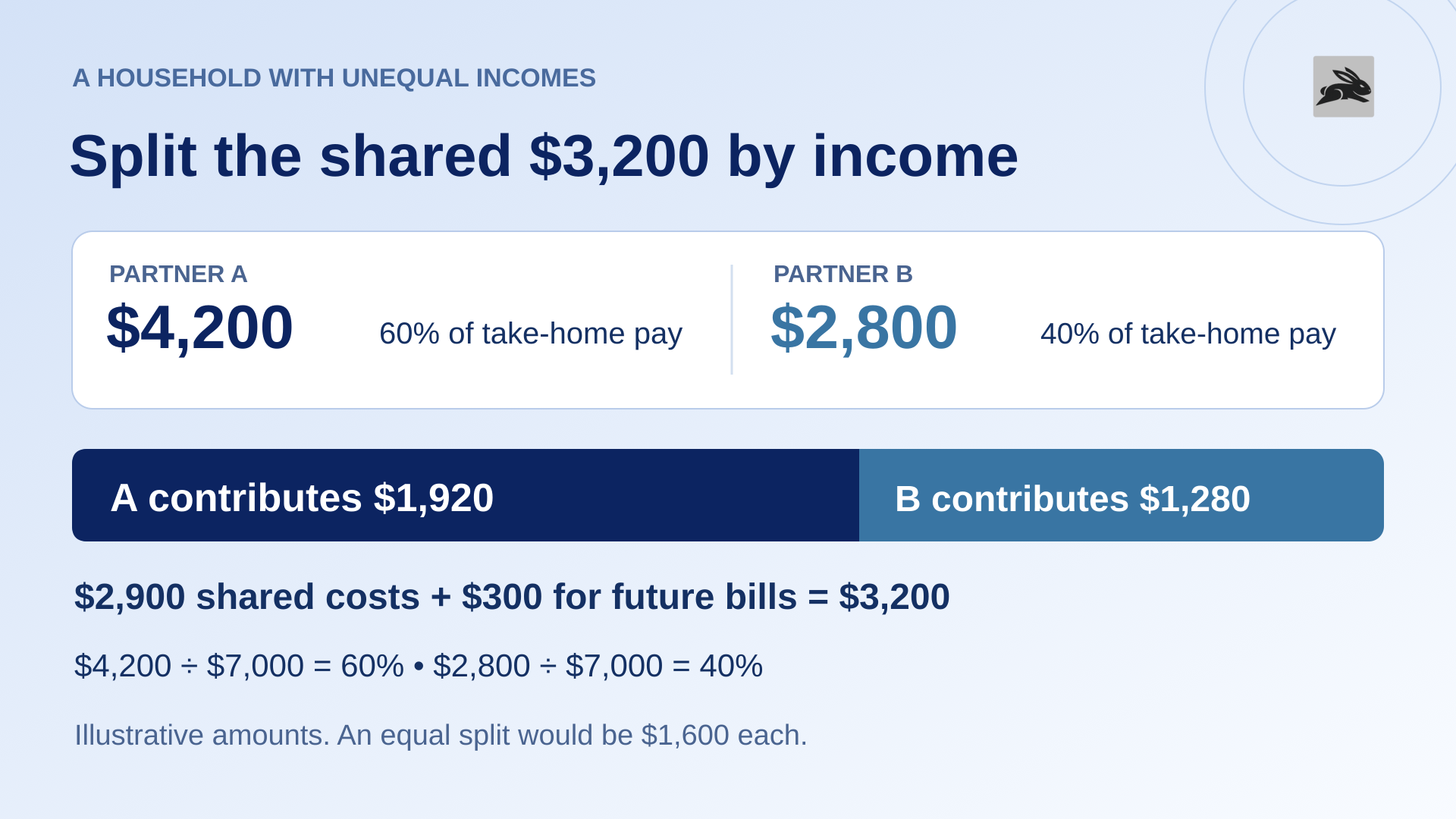
To divide that target in proportion to income, divide each person’s take-home pay by $7,000. Partner A contributes 60% of $3,200, or $1,920. Partner B contributes 40%, or $1,280. An equal split would be $1,600 each. Compare both arrangements against each person’s remaining obligations before settling on a rule.
Represent the same agreement in each app
In YNAB or Goodbudget, create categories or envelopes for the shared costs and fund them with available money. In Monarch or Simplifi, set up the shared spending plan and review the accounts included. In Honeydue, agree on visibility for each account before checking shared spending. Put the contribution amounts in a recurring reminder if your chosen app does not calculate your agreed split.
If you need a starting point for categories, the 50/30/20 budget worksheet separates needs, wants, and savings. Adjust those reference amounts to the household’s actual costs.
For the $300 reserved for future bills, give each goal a purpose and deadline. Our guide to tracking financial goals shows how to compare a planned contribution with the amount actually saved.
Known future bills belong in a sinking fund with a target and due date, so an annual charge does not become a surprise monthly shortfall.
Check one purchase and its reimbursement
Now suppose Partner A pays $140 for shared groceries on a personal card. Under their 60/40 rule, A’s share is $84 and B’s is $56. Record the $140 purchase once. If both sides of B’s reimbursement are included in the household records, treat those entries consistently as money moving between partners. Check that grocery spending remains $140 and that the reimbursement has not inflated household income.
If the personal card is outside the shared app, agree on how to enter that purchase manually. A household budget can balance while missing purchases made in accounts it never sees. Review the actual accounts and statement entries whenever a total looks wrong.
For more detail on keeping transaction totals accurate, compare expense tracker apps and test cash withdrawals, refunds, and credit-card repayments.
Try the app together before paying for a year

Run this seven-day check with the two strongest candidates. Use a free plan or available trial, and check cancellation and billing terms before starting. For every item, record whether both people could complete it and how long it took.
| When | What to check | A result you can verify |
|---|---|---|
| Day 1 | Join from each person’s own device. | Both can reach the intended household budget. |
| Days 2–3 | Review imported or manually entered purchases. | Amounts match statements, with no missing or duplicate entries. |
| Day 4 | Add a shared purchase and reimbursement. | The expense appears once and the repayment is classified consistently. |
| Day 5 | Inspect the budget from each person’s login. | Visibility matches the privacy agreement. |
| Days 6–7 | Review bills, a goal, and an overspent category. | Both people can explain what remains available and what needs adjusting. |
When you review the household’s software costs, use a subscription tracker to record renewal dates and cancellation deadlines before choosing an annual plan.
Make the subscription decision
Compare the work each person will do every week. If one app needs fewer corrections at your banks, record that advantage. If someone cannot understand the remaining grocery balance or feels uncomfortable with the access rules, resolve that before entering more accounts.
Then compare the annual household charge with your monthly budget. Monarch Core costs $9.01 less per year than YNAB’s annual plan. Goodbudget Premium costs $40 less per year than twelve monthly payments. Those differences matter most after the app fits your sharing arrangement and both people can keep its numbers current.












Comments 1