

Start with QuickBooks Online if your bookkeeper already works in it. Compare Xero if several people need their own logins, FreshBooks if you bill clients for time, and Zoho Books if you want bank feeds at a lower subscription price. For a solo business comfortable uploading statements, Wave Starter can cover invoicing and basic bookkeeping at $0 a month. For inventory, accountant access, and month-end reporting, compare the best small business accounting software using the same sample transactions.
The right choice is the least expensive plan that handles your busiest month. Count staff logins, invoices, vendor bills, and any inventory or project work before comparing prices. For example, if your transaction volume pushes you from Xero Early to Growing, your comparison should use $59 a month.

What is cloud accounting software
Cloud accounting software keeps your business books online so you can record expenses, send invoices, reconcile accounts, and share reports with authorized users. A bank feed brings transactions into the app. Reconciliation checks that the entries in your books agree with the bank statement. Xero’s cloud accounting guide.
If you mainly want to track household spending and investments, start with our comparison of Quicken alternatives.
Compare five cloud accounting tools
These are regular US prices as of November 7, 2026. Monthly prices exclude taxes, promotions, payment processing, payroll, and other add-ons. Annual billing is shown separately where noted.
| Software | Entry price | Good fit | Limit that can change the price |
|---|---|---|---|
| QuickBooks Online | $0 Free $38 Simple Start | Businesses working with a QuickBooks bookkeeper | Free has one user and no accountant access. Essentials is $85 for three users. |
| Xero | $27 Early | Teams that need multiple logins | Early has a 20-invoice and five-bill monthly limit. Growing is $59. |
| FreshBooks | $23 Lite | Freelancers and client service teams | Lite caps billing at five clients. Plus is $43 and adds accountant access and bank reconciliation. |
| Zoho Books | $0 Free $20 Standard | Small teams looking for lower-cost bank feeds | Free has a revenue threshold. Standard adds bank feeds and includes three users. |
| Wave | $0 Starter | Solo businesses willing to import statements | Automatic bank imports require Pro at $19 monthly or $190 billed annually. |
QuickBooks Online for working with your bookkeeper
Simple Start includes one regular user and access for two accountants. If three staff members need logins, look at Essentials. If your store needs built-in inventory tracking, compare Plus at $140 a month, which also includes five regular users. The Free plan connects one bank account and limits sending to two invoices per month unless you qualify for and enable QuickBooks Payments. Intuit plan details.
Xero for a team with several logins
Xero includes unlimited users on its business plans. Early can work if your volume stays inside its caps. Count invoices created through connected apps when estimating usage because those transactions can count toward the limit. Growing removes the Early invoice and bill caps. Established at $97 a month adds multicurrency and project tracking. Xero plan details and user and invoicing limits.
Options for freelancers and smaller teams
FreshBooks for client billing
Choose FreshBooks if you frequently turn project time and expenses into client invoices. Lite covers up to five billable clients. If you need bank reconciliation or an accountant login, start with Plus even if you have fewer than five clients. Plus covers 50 billable clients, and additional team members cost $11 per user per month. Premium at $70 adds unlimited billable clients and project profitability. FreshBooks plan details and bank reconciliation availability.
If you charge clients for travel or materials, try adding a reimbursable purchase to an invoice and check where the expense and reimbursement appear in your reports. Our guide explains how to read billable expense income.
For a billing-focused shortlist, our freelancer invoicing software comparison separates the monthly subscription from payment fees and includes tools with proposals, contracts, and time tracking.
Zoho Books for low subscription costs and inventory options
Zoho Books Free includes one user plus one accountant and allows up to 1,000 invoices per year. Eligibility depends on staying within the $50,000 financial-year revenue threshold. Standard adds bank feeds for $20 billed monthly or $180 billed annually. Professional is $50 monthly and adds inventory tracking and purchase orders. If you need warehouse management or serial-number tracking, check Elite before committing. Zoho Books plan details.
Wave for free bookkeeping with manual imports
Wave Starter includes unlimited invoices and manual statement uploads. Pro adds automatic imports from supported banks. Check your institution before paying for that feature. Wave charges per business profile, so two businesses on monthly Pro would cost $38 a month before taxes. Wave pricing and Starter features.
Compare payment costs separately from the plan price
Suppose a business takes 20 Visa payments of $250 each through Wave in one monthly billing period. At the published US rates, Starter processing totals $157. On Pro, the first ten eligible card transactions lose the $0.60 fixed fee, so processing totals $151. Adding the $19 monthly subscription brings Pro to $170 before tax. In this example, Pro costs $13 more overall. Decide whether the bank imports and other Pro features are worth that difference. Wave’s card fee terms.
How to compare the annual cost of the plan you need
Consider a small agency that needs three staff logins, automatic bank feeds, 24 invoices, and eight vendor bills each month. It bills in US dollars and needs neither payroll nor inventory. Assume its bank and required integrations work on each candidate plan. If bank matching and bill entry are the main bottlenecks, see how to test accounting automation with a sample workflow.
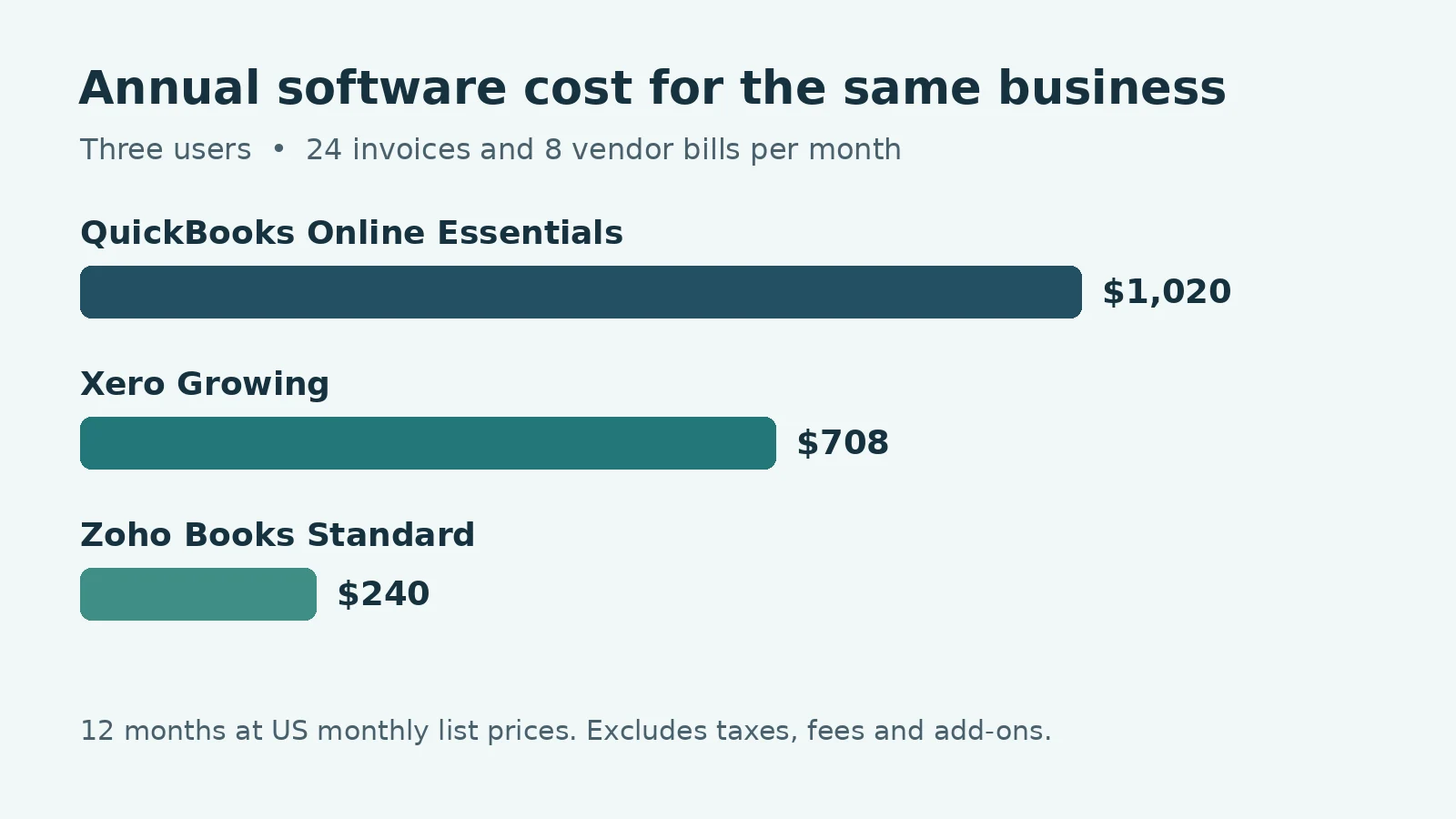
QuickBooks Simple Start has room for one staff user, so the agency would need Essentials at $85 a month. Xero Early falls short on both invoice and bill volume, which moves the agency to Growing at $59. Zoho Standard provides three users and bank feeds at $20. At those monthly rates, Xero costs $312 less per year than QuickBooks, and Zoho costs $468 less than Xero.
Zoho has the lowest subscription cost of the three plans shown. Annual billing would reduce its subscription to $180 paid for the year. If the bookkeeper quotes an extra $40 a month to work in Zoho instead of Xero, that adds $480 over 12 months. With both subscriptions billed monthly, Zoho would then cost $720 versus $708 for Xero, assuming equal costs elsewhere.
Wave Pro is also worth pricing at $19 a month if its bank connection and predefined staff roles fit the agency. Check the permissions for the people who enter bills, send invoices, and review reports. Wave collaborator permissions.
Build a budget from recurring and one-time costs
For each candidate, add the required plan, staff seats, payroll or other integrations, and payment fees at your usual transaction volume. Add migration and training to the first-year total. Compare that figure with the ongoing annual cost after any introductory offer. For a like-for-like comparison, keep the number of businesses, users, and transactions constant. Use our small business payroll software comparison to estimate what filings and multistate payroll add to the annual cost.
Run a sample month before switching
Use sample data first and try the exact plan you intend to buy. Ask your bookkeeper to open the reports and test permissions with a separate login. If your trial includes a higher tier, check that each workflow is available on the plan you priced.
Check the workflow from invoice to bank deposit
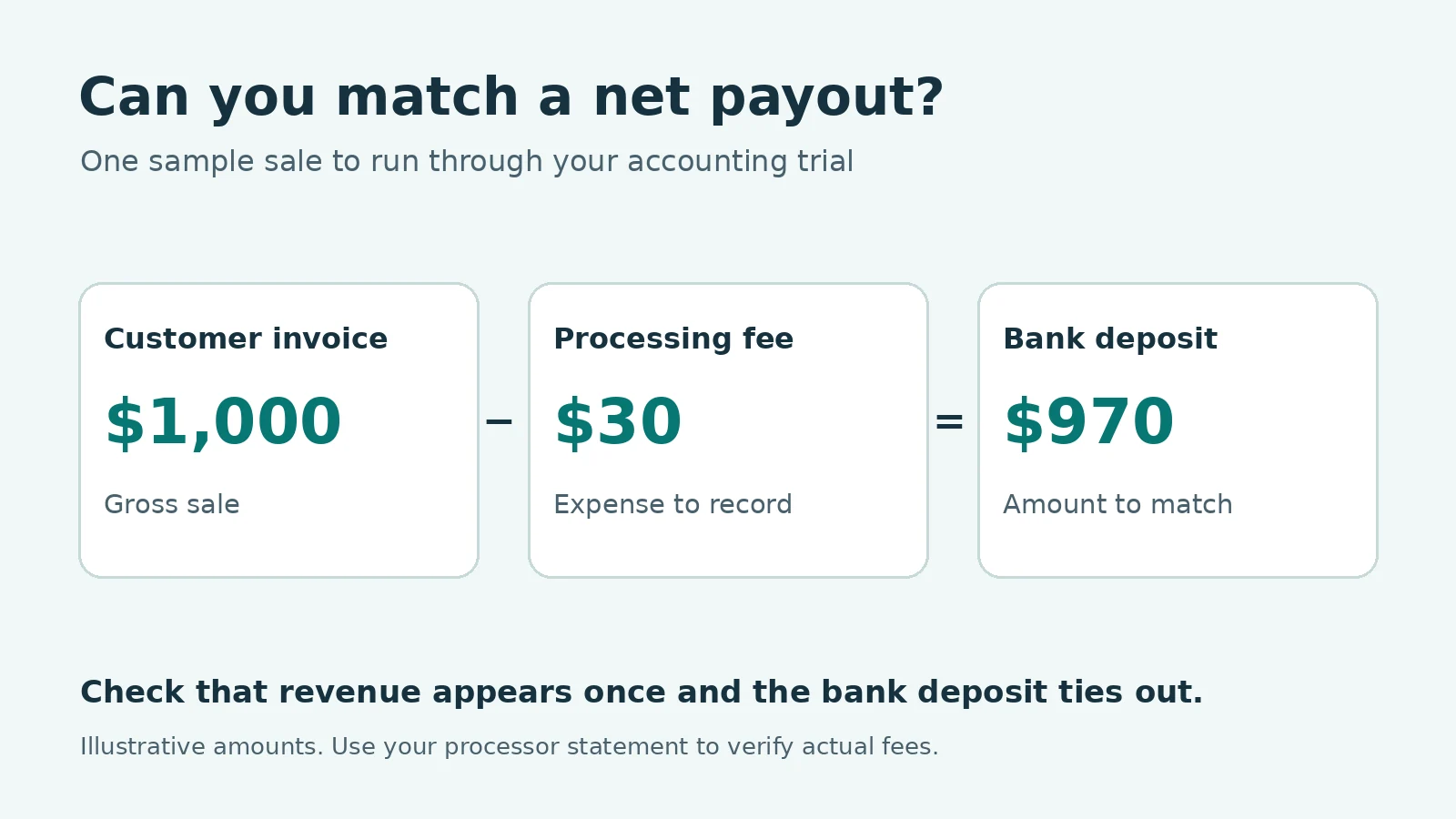
Create a sample $1,000 invoice and record the customer payment in full. Record the $30 processing fee and match the $970 deposit to the payout. Check that the invoice closes and the sale appears once in your reports. Use a processor settlement report to check a batch payout with multiple sales or refunds. A bank deposit shows cash received. Your net income also reflects the other expenses recorded in your books.
Confirm that your team can close the books and export records
Connect or import one statement and reconcile it through the closing date. Run a profit and loss statement, balance sheet, and unpaid invoice report. Try exporting the general ledger, invoices, and attachments, and open the files outside the app. Turn on multifactor authentication and check that staff can reach only the records they need.
Before switching, save the old trial balance, open invoices and bills, statements, and supporting documents. Agree on a cutoff date with your bookkeeper so a new bank feed and an old import do not duplicate transactions. Verify the opening balances and first reconciliation in the new system before ending access to the old one. The IRS requires electronic records to be complete, accurate, and accessible. IRS guidance on recording business transactions.












Comments 7