


Rocket Money is worth trying free if you want to see what’s billing you across several cards or bank accounts. Pay for Premium if you’ll use the cancellation service or build a budget in the app. Consider Premium+ only if you expect its bill negotiation or other extras to justify $15 a month plus tax. For new negotiations, the old percentage-based success fee no longer applies. Rocket Money moved the service to Premium+ on November 2, 2026.
The best first test is to link the card you already use for subscriptions and see whether Rocket Money finds charges you can match to your statement. A useful recurring list can save time even if you cancel everything yourself. If your main goal is to build a free category budget, check what your account offers before relying on it.


What we could verify directly
We opened Rocket Money’s public web signup and checked what it asks for before you reach the app. The form required a name, email address, and acceptance of the Rocket account and service terms. Our check ended at that screen. In-app observations below are attributed to published testing or Rocket Money’s documentation.
Rocket Money describes a view-only demo in its mobile app that disguises account data. The company documents it as an option inside the app. If you use it, treat what you see as a tour of the interface. To measure detection accuracy or see whether a cancellation goes through, you need a real recurring charge to compare with the result.
Who should try it first
Rocket Money is a better fit if subscriptions renew on several cards or you’ve lost track of which companies bill you. If all your charges run through one store or card, start with that store’s subscription list and a statement review. You may be able to make the same decisions in fewer steps.
How much does Rocket Money cost?
Rocket Money lists three US tiers. Its published Premium range is typical and may vary by platform or offer, so use the price and renewal date shown in your account. The amounts below describe the plans as of November 17, 2026.
| Plan | Published price | What you can use it for |
|---|---|---|
| Free | $0 | See recurring charges, review linked-account spending, and get bill reminders on mobile. |
| Premium | Typically $7–$14 per month | Request eligible cancellations, build category budgets, and use the full desktop experience. |
| Premium+ | $15 per month plus tax | Get Premium features and submit new bill negotiations without an added success fee. |
What the free plan can tell you
Start with the free mobile app for spending visibility and recurring-charge discovery. Rocket Money’s current pricing table and budget setup guidance put category budgets on paid plans. Some older descriptions mention limited free budgeting. Plan around the free tools clearly available today, and check what appears in your account before moving a full budget into Rocket Money.
Desktop access is also limited on Free. Rocket Money’s desktop help says free members can still manage certain settings and connections on the web. If you want to review and manage your full budget from a computer, include the paid plan in your comparison.
If you try the paid budget, set up one category first, such as groceries. Compare its total with a few posted purchases. Check for a refund, a split purchase, and a transfer that could be mistaken for spending. If fixing those entries takes more time than your current budget, a wider category setup will probably add work. The trial is most informative when you use it to make one real spending decision.
When Premium is worth the charge
Rocket Money advertises a seven-day Premium trial for new members, then renews at the price you select. At a hypothetical $10 per month, keeping Premium for a year costs $120. If you canceled an unused $9 monthly subscription, you’d avoid $108 over the next 12 months if the subscription would otherwise have renewed all year. That change alone falls $12 short of the annual Premium cost, before any applicable tax.
An easy cancellation can be worth paying for if it gets a difficult task done. If you’re paying mainly for that service, reassess after the cancellations are confirmed. If you want a full monthly household plan, compare the workflows in our Rocket Money vs Monarch guide. If the price of ongoing category budgets is the sticking point, compare free budgeting apps.
How subscription tracking and cancellation work

Rocket Money looks for patterns in transactions from linked accounts and shows recurring charges together. Start with the card or checking account that pays most of your subscriptions. Compare the Recurring list with two recent statements. Search farther back for annual renewals, which a two-month check can miss. If a charge is absent, check which account actually paid it and whether it came through an app store or payment service. If you want a low-tech starting point, use the monthly budget template to capture monthly bills and keep yearly renewals on the calendar.
On Premium or Premium+, Rocket Money’s cancellation instructions direct you to Recurring, then to the menu beside the subscription. If the option is available, select Cancel and choose the service that requests cancellation for you. Some subscriptions must be canceled through the store or provider that bills you. If a renewal is close, check the merchant’s own cancellation process immediately.
For a wider shortlist beyond Rocket Money, compare our best subscription tracker apps on charge discovery, renewal reminders, manual lists, and cancellation help.
Check that the renewal actually stops
Write down the merchant, amount, next renewal, and billing channel before you make a request. Save the confirmation when the cancellation is complete, and check the next statement around the date the charge would have posted. Treat a request as pending until you have confirmation. If the service still charges you, those records help you follow up with the right billing company.
Try the same check on a charge you want to keep. A useful dashboard should let you distinguish a service you recognize from a charge you need to investigate. If the label is unclear, match the date and amount to a receipt before canceling anything.
Does Rocket Money bill negotiation pay for itself?
For new requests since November 2, 2026, Rocket Money requires Premium+. It says members can have one active negotiation at a time and pay no separate success fee on those requests. Requests submitted before the switch may still be processed under the original agreement. The prior fee on a successful request was 35% to 60% of first-year savings. Check the request date and agreement if an older fee appears.
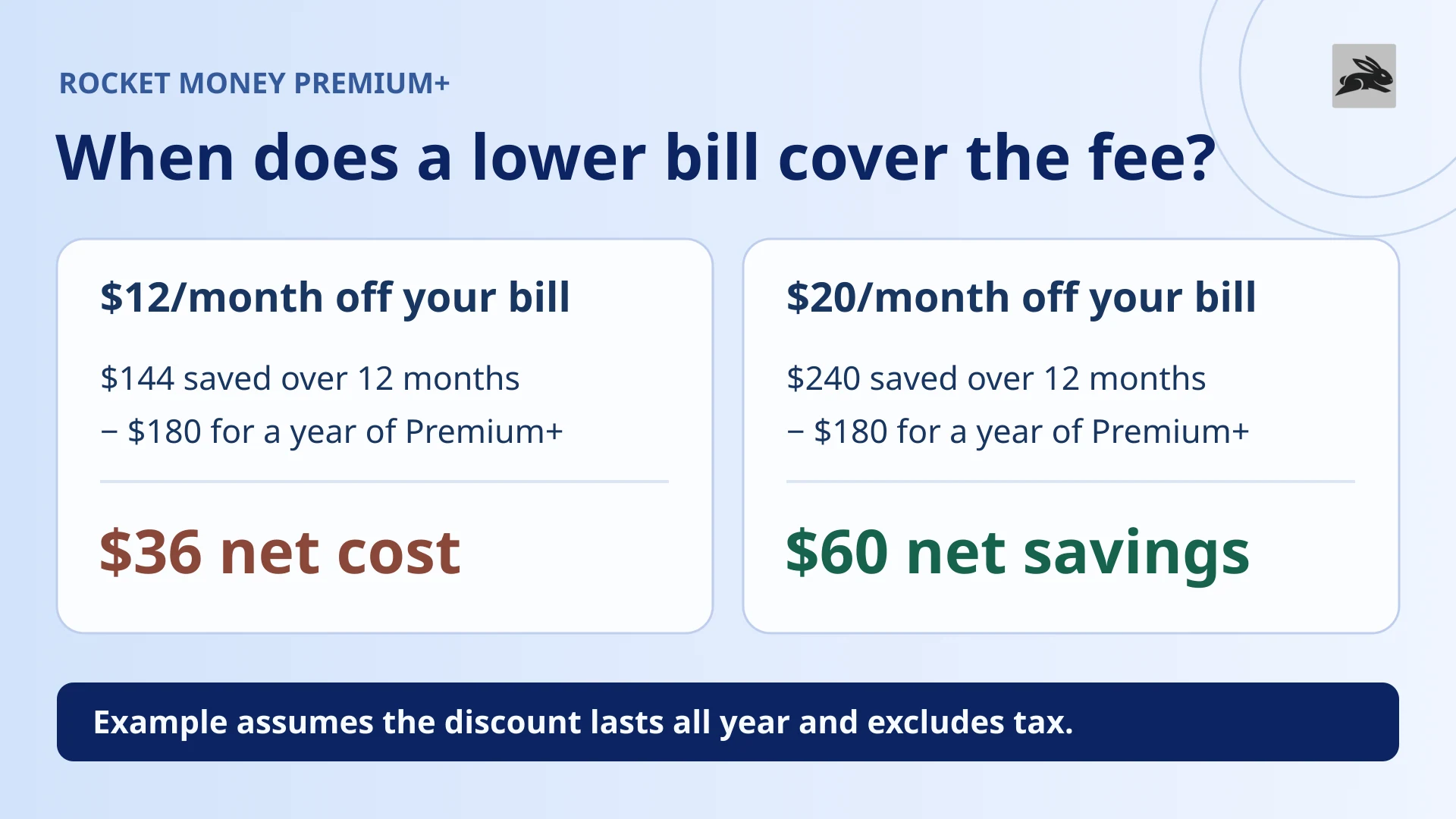
At $15 per month before tax, Premium+ costs $180 over a year. If you’d otherwise stay on Free, a $12 monthly bill reduction for 12 months saves $144 and leaves you $36 short of covering a year of Premium+. A $20 monthly reduction for 12 months saves $240 and leaves $60 after the subscription cost, before tax.
If you already intend to keep Premium at $10 a month, upgrading to Premium+ adds $5 a month before any tax difference. In that case, compare the discount with $60 in extra annual fees. Also ask when the new rate ends, whether the package or service speed changes, and whether you could get the same offer directly from the provider.
Match the length of the discount to how long you expect to keep Premium+. A $20 discount that lasts only six months saves $120. If you pay for Premium+ for all 12 months and use it for nothing else, that leaves a $60 net cost before tax. Ask for the end date of any promotional rate so you can set a reminder before the bill goes back up.
What a published hands-on test found
R.J. Weiss of The Ways To Wealth reported a $20 monthly cable and internet discount after Rocket Money switched him to a different plan. His test used the earlier success-fee model, and his publication discloses that it may earn money from links or signups. It shows that a negotiation can change both the price and the plan. Use the current membership cost and your own provider’s offer to judge whether the service makes sense for you.
If you need more than subscription monitoring, compare expense tracker apps for personal spending and work receipts. Check manual entries, scanning quotas, and usable exports.
Run a first-week check before you pay
Before you link anything, decide what success would look like. If the aim is to find unused subscriptions, one clean list that matches your statements is more valuable than a set of charts. If the aim is to budget, choose a category where better information would actually change what you spend.
| What to check | What a pass looks like |
|---|---|
| Bank and card coverage | The account you use for renewals connects, and known transactions show up. |
| Recurring charges | The merchant, amount, and timing match several renewals you recognize. |
| Category budget | You can set a useful limit, correct a category, and read the amount left. |
| Cancellation or negotiation | You know who bills you, what you requested, and how you’ll confirm the result. |
| Renewal timing | You know the price, when you’ll be charged, and where you can cancel the membership. |
Rocket Money says it uses Plaid for many bank connections and Akoya for Fidelity. When deciding what to connect, start with the account needed for your first check. If a card connection fails or its transactions arrive late, compare against the bank’s record before trusting the recurring list. If you prefer to keep accounts unlinked, a statement-based 50/30/20 budget worksheet offers a manual starting point.
How do you cancel Rocket Money Premium?
Open Rocket Money’s Premium membership settings and follow the cancellation prompts. If your billing is managed by Apple or Google Play, check that store’s subscriptions screen. Keep the confirmation and check the next renewal date. Canceling the paid membership leaves the Rocket Money account in place.
Sources
Rocket Money plan comparison and pricing and trial terms
Rocket Money’s subscription cancellation guide and membership settings
Rocket Money’s November bill negotiation update and legacy fees
Rocket Money security and account connections and demo mode
R.J. Weiss’s hands-on Rocket Money review for The Ways To Wealth












Comments 2