


Choose Rocket Money if your main goal is finding recurring charges and getting help canceling unwanted subscriptions. Choose Monarch if you want a more flexible household budget, spending reports, and investment tracking in one place. Rocket Money has a free starting point; Monarch requires a paid subscription after its trial.
The price comparison is closer than it first appears. Monarch Core costs $99.99 a year, while Rocket Money Premium uses a variable monthly price. Both support couples on paid plans. Rocket Money also has a $15-a-month Premium+ tier, and its bill-negotiation rules changed on November 2, 2026.


This comparison uses published product documentation, including Rocket Money’s negotiation policy in force since November 2, 2026. Recommendations reflect feature fit rather than hands-on performance tests conducted by IncomeBunny.
Rocket Money vs Monarch at a glance
| What matters to you | Rocket Money | Monarch |
|---|---|---|
| Starting without a subscription | Free subscription and spending tracking | Seven-day trial; no ongoing free plan |
| Canceling unwanted services | Premium includes cancellation assistance; some billers require you to cancel directly | Tracks recurring expenses; you handle cancellation |
| Budgeting approach | Income, bills, and spending categories; paid plans add customization | Category budgeting or Flex budgeting |
| Sharing with a partner | Premium supports the account holder plus one partner, with separate logins | Household members get separate logins under one subscription |
| Seeing assets and debts | Net worth tracking on Premium | Net worth, investment tracking, and broader reporting |
| Negotiating bills | Premium+ includes negotiation without a separate success fee; new requests have required it since November 2, 2026 | No equivalent negotiation service |
Our pick for ongoing household planning is Monarch Core. Its budgeting choices and reports are the stronger reason to pay every year. Rocket Money is the better starting point for a subscription audit, and its paid cancellation service can justify an upgrade if it saves you work you would otherwise avoid.
Neither choice removes the need to check transactions. A missing bank connection or incorrectly categorized transfer can make a polished dashboard misleading.
Pricing and fees compared
US prices below exclude applicable taxes and temporary promotions. Monthly equivalents for annual plans are not monthly payment options.
| Plan | Published price | Cost over 12 months |
|---|---|---|
| Rocket Money Free | $0 | $0 |
| Rocket Money Premium | Choose a monthly price within the available range; offers vary by platform | Your selected monthly price × 12 |
| Rocket Money Premium+ | $15 monthly | $180 if kept for all 12 months |
| Monarch Core annual | $99.99 paid annually | $99.99 |
| Monarch Core monthly | $14.99 monthly | $179.88 if kept for all 12 months |
| Monarch Plus annual | $199.99 paid annually | $199.99 |
Rocket Money’s pricing guidance says Premium prices can vary across platforms and new members receive a seven-day trial. Read the selected amount and billing terms at signup rather than relying on an old review’s price range.
Monarch’s pricing page lists Core and Plus. Core covers everyday budgeting, reports, net worth, and goals. Plus adds tools such as long-term forecasting, business tracking, and advanced investment analysis. Start with Core unless you need those specific additions; ordinary household budgeting does not require Plus.
Which app is actually cheaper
Rocket Money Free wins on price for tracking. Between paid plans, use $8.33 per month as an approximate comparison point, because $99.99 ÷ 12 = $8.3325. A hypothetical $8 Rocket Money Premium offer costs $96 over a year, slightly less than Monarch Core annual. A $10 monthly offer costs $120, or $20.01 more. If you want to avoid a subscription, compare budgeting apps with ongoing free plans to see which budgeting features you can keep using after signup without paying.
Those examples are calculations, not promises that either price will appear in your account. Monarch’s annual charge also requires more money upfront. Its Core monthly option is useful for a longer evaluation, but twelve monthly payments cost $79.89 more than the annual plan.
The bill negotiation change matters
According to Rocket Money’s November 2 policy announcement, new negotiation requests have required Premium+ since November 2, 2026. Premium+ costs $15 monthly plus tax and has no added negotiation success fee. Only one negotiation can be in progress at a time.
Existing negotiations continue under their original agreements; upgrading does not erase an agreed fee. Before the change, fee-based negotiations outside Premium+ could charge 35%–60% of first-year savings. Keep an existing fee obligation separate from the cost of a new membership.
Value test: If you kept Premium+ for a year solely to obtain a $20 monthly bill reduction that lasted all year, gross savings would be $240. Subtract $180 in membership charges and the result is $60 before tax. If you already intended to pay for Premium, compare the incremental upgrade cost instead. Neither a successful negotiation nor a particular savings amount is guaranteed.
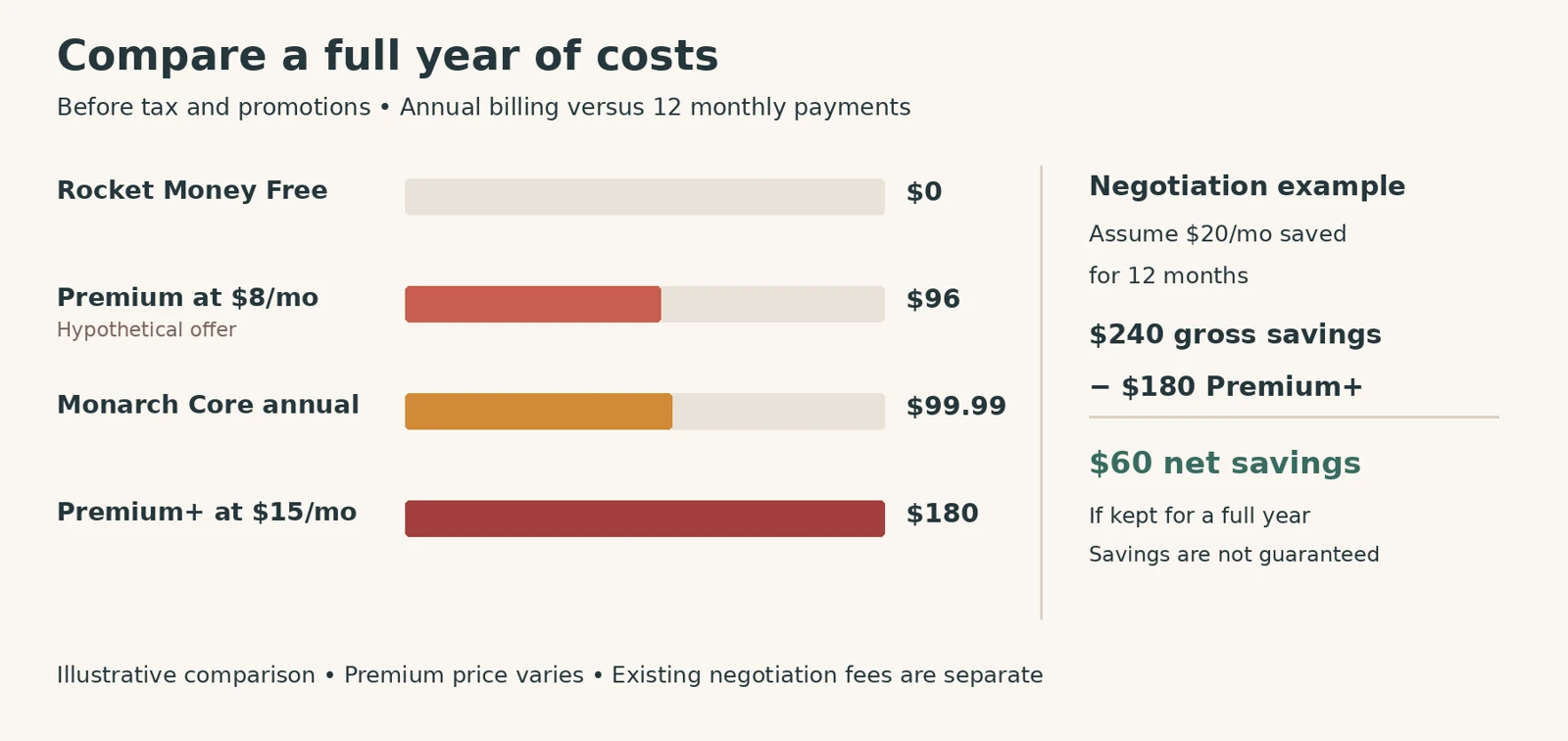
Illustrative full-year costs and negotiation outcome, excluding tax and promotions. The $8 Premium price is hypothetical, not a guaranteed offer.
Budgeting and reporting compared
Monarch offers more ways to structure a household plan
Monarch is our preference if you want to decide how the whole month should work. Category budgeting lets you plan individual categories; Flex budgeting groups expenses into Fixed, Non-monthly, and Flex buckets. Its Flex budgeting guide explains that the overall Flex amount can cover variable spending without requiring a limit for every category.
For example, a household could plan $5,000 in monthly take-home income as $2,500 for fixed expenses, $500 for non-monthly costs, $1,200 for flexible spending, and $800 toward savings. These illustrative allocations total $5,000. The attraction is reviewing one overall flexible-spending limit while still seeing where the money went.
Start with take-home income rather than gross pay, then distinguish recurring fixed expenses from variable spending. An attractive dashboard is useful only when the underlying income and categories are consistent.
Monarch is less compelling if you will not maintain categories or review reports. Paying for more detailed information is useful only when it changes a decision.
Rocket Money suits a simpler spending review
Rocket Money’s budget setup starts with monthly income, bills, and spending categories. Premium adds tools such as custom categories and transaction rules. Its current budget-creation guide places that workflow on Premium and Premium+, while other official pages still describe limited free budgeting. Treat free budget availability as something to verify in your own account; use the free plan primarily to evaluate tracking before paying for a budgeting workflow.
The practical test is whether you can quickly answer “What did we spend?” and correct the exceptions. If your main task is spotting recurring charges and keeping a few spending categories under control, Rocket Money may provide enough without Monarch’s broader reporting.
Category winner: Monarch for budgeting flexibility and analysis. Rocket Money remains a reasonable fit when a simpler review is the job you need done.
If assigning each available dollar is the feature you are missing, our YNAB and Monarch budgeting comparison explains the difference between funding cash categories and setting a monthly household plan.
Subscription cancellation and bill management compared
Rocket Money’s advantage is assistance with taking action, rather than simply displaying charges. Its official FAQ distinguishes free tracking from paid cancellation assistance. Seeing a subscription in the app does not mean it has been canceled, and a request is not the same as a completed cancellation.
One important exception is Apple billing. Rocket Money says it cannot directly cancel subscriptions billed through Apple. On an iPhone, review Settings → your name → Subscriptions and cancel the relevant service there. Keep the confirmation and check the next statement.
The same distinction applies to software you stop using: disconnecting or deleting an app does not reliably stop renewal charges. Identify who bills you and keep a cancellation confirmation.
Monarch provides a recurring-expense view for planning upcoming charges, but you contact the merchant or billing platform yourself. That is sufficient if you already handle cancellations promptly. Rocket Money’s concierge is more attractive when avoiding those tasks is the reason charges keep renewing.
Category winner: Rocket Money for cancellation assistance and negotiation. For either app, audit annual subscriptions as well as monthly ones. Compare overlapping services before deciding which to retain.
If subscription cleanup is your main goal, our subscription tracker app comparison includes automatic and manual alternatives, with their renewal and cancellation limits.
Couples and household sharing compared

Illustrative household review using an edited stock photograph; the people shown are not reviewers or endorsers of either app.
Both apps support separate logins for shared finances. Rocket Money Premium account sharing covers the primary user and one partner under one membership. Both can view and manage linked budgets, subscriptions, and transactions.
Monarch’s household sharing allows household members to contribute accounts and work within one shared financial picture without an extra membership charge. It also lets partners flag transactions for review, which is useful when one person cannot identify a purchase made by the other.
The important privacy question is visibility: separate logins do not mean private transaction histories inside the shared household. Agree which accounts belong in the shared space before linking them. If you need to hide personal spending from other household members, do not assume either setup provides that separation.
Category winner: Monarch for a household built around shared planning and reviews. Rocket Money’s two-person sharing means couples focused on subscription cleanup do not need Monarch solely to obtain separate logins.
For a decision centered on two people sharing bills, our budgeting apps for couples comparison covers privacy, joint costs, and reimbursement calculations across more tools.
Investments goals and account connections compared
Both apps can show a net worth picture; Rocket Money is not limited to a list of subscriptions. Its Premium net worth tools include assets and debts. Monarch goes further into investment reporting, making it our choice when you want to review holdings and allocation alongside everyday spending. Check which advanced analysis requires Plus before upgrading.
There is also a meaningful difference between tracking a savings goal and moving money. Rocket Money’s Financial Goals documentation describes automatic transfers from a linked checking account into a non-interest-bearing custodial plan at a partner institution. That is separate from Premium+ eligibility to apply for a high-yield savings account. Monarch’s goal tracking does not itself transfer your savings.
Before enabling automatic saving, review the transfer schedule, withdrawal process, and checking-account cushion. A projected saving amount on a dashboard is not proof that cash has moved.
For connections, test your actual institutions rather than choosing by the largest advertised bank count. Link your most important checking account, credit card, and investment account first. Check transaction history, refresh dates, and duplicate entries. No comparison can establish which app will sync your particular accounts most reliably without testing them.
If the whole household will use the budget, our household budgeting app comparison adds a practical test of member access, shared purchases, and contribution rules.
A practical trial test before you commit
Use the same accounts and sample month in both apps. This makes the comparison more useful than judging their initial dashboards.
1. Check completeness. Confirm that essential accounts connect and balances match the institutions’ records. Record any account you must maintain manually.
2. Review ten transactions. Include groceries, a refund, a subscription, and a transfer. Check that transfers and credit-card payments are not counted twice as spending.
3. Rebuild one real budget. Include an annual expense, not just this month’s bills. Decide whether Monarch’s Flex view or Rocket Money’s category setup is easier for you to maintain.
4. Test the household workflow. Invite your partner if relevant. Each person should identify an unfamiliar charge and understand what information becomes shared.
5. Check the bill you will actually pay. Record the renewal price, billing route, trial deadline, and any existing negotiation fee. Set your own reminder before the trial ends.
Enable multifactor authentication where available and retain a recovery method. If code delivery becomes an obstacle, consult official support. Do not remove a working recovery method simply to make setup faster.
Final verdict on Rocket Money vs Monarch
Pick Rocket Money Free to find recurring expenses and evaluate account tracking without adding another subscription. Upgrade to Premium when cancellation assistance, sharing, or paid budgeting features solve a recurring problem. Consider Premium+ specifically for its added services, using the November 2 negotiation policy and your likely membership duration in the calculation.
Pick Monarch Core for a continuing household system that combines flexible budgets, reports, goals, and investment tracking. Its $99.99 annual price can be lower than a full year of Rocket Money Premium, depending on the offer you select. Choose Plus only when its forecasting, business, or advanced investment tools justify the extra cost.
Keep the app that connects your essential accounts and supports a review you will actually repeat. Better-looking reports and a longer feature list are secondary to accurate data and a habit that lasts.
For a desktop ledger or a broader software shortlist, see our Quicken replacement options and test reconciliation, exports, and investment records before moving.











Comments 4