


Start with QuickBooks Online or Xero if bank matching and transaction coding are the main delays. Add Dext when receipts and supplier invoices pile up before they reach the ledger. Choose BILL when approvals and supplier payments are the bottleneck, Ramp when you want to control employee spending and capture expenses in one place, or FloQast when reconciliations and sign-offs delay the month-end close.
The best accounting automation software for your business is the one that fixes the slowest recurring step and makes mistakes easier to catch. A tool that reads an invoice can still leave you to approve it, pay it, and reconcile the payment. Test that handoff before buying.

What is accounting automation?
Accounting automation uses software to do repeatable steps such as importing transactions, extracting invoice details, suggesting categories, matching payments, and routing approvals. Some tools are the system where you keep the books. Others send transactions to that system or track whether the close is ready to sign off.
Start with a week’s worth of work. Note where a transaction waits, where someone types the same amount twice, and which mistakes require the most cleanup. If receipts are missing, better collection may matter more than smarter coding. If the bills are already entered but sit unsigned, look at approval routing. If reconciliations are complete but nobody knows who reviewed them, compare close tools.
Map that delay to the tools you already pay for. Our cloud accounting comparison covers the base ledgers. If the underlying ledger still needs replacing, start with our small business accounting software comparison.
For freelancers whose bottleneck is sending invoices or chasing client payments, compare invoicing software with recurring billing and payment reminders. That workflow is different from capturing supplier bills or automating the ledger.
Accounting automation software compared
These are regular U.S. prices where listed, checked in November 2026. Compare the plan that includes your workflow and add taxes, payment charges, and any separate ledger subscription.
| Software | Where it fits | Price or limit to check |
|---|---|---|
| QuickBooks Online | Ledger with bank rules and transaction matching. | Simple Start is $38/month at regular pricing. |
| Xero | Ledger with bank reconciliation and eligible automatic matching. | Growing is $59/month at regular pricing. |
| Dext | Receipt and invoice capture before entries reach the ledger. | Published example is $302.50/year for 250 documents/month and five users. |
| BILL | Supplier bill approval, payment, and ledger sync. | Team is $65/user/month and lists two-way sync with QuickBooks Online and Xero. |
| Ramp | Employee spend, receipts, reimbursements, and bill pay. | Free software tier. Plus is $15/user/month plus a platform fee. |
| FloQast | Month-end checklists, reconciliations, and sign-offs. | Request pricing for the close and automation features you need. |
QuickBooks Online for predictable bank rules
Use bank rules for repeatable transactions that are easy to identify. Intuit lets you define conditions and choose whether a rule auto-posts matching transactions. Start with a narrow rule for a stable expense and review the matches before turning on automatic posting. A rule that catches every transaction from a marketplace can put equipment, subscriptions, and reimbursable costs into the same category. QuickBooks pricing and Intuit’s bank rules guide.
Xero for automatic bank reconciliation
Xero lists automatic bank reconciliation on Growing and above in the U.S. Test it with your actual bank feed and transaction patterns. For example, upload a sample statement with one transfer between your own accounts and one payout that bundles multiple transactions. Check which entries reconcile on their own and which need review. Compare the resulting balance with the statement. Xero’s U.S. plans and Xero’s bank reconciliation guide.
Before upgrading, check where automatic matches appear and what you can undo. A suggestion awaiting review is a different control from a transaction already posted. If a broad rule miscoded several transactions, find out how you would identify every affected entry and correct the ledger. For a small team, that recovery step can matter more than the number of rules the plan supports.
When to add a specialist tool
Dext for receipts and supplier invoice capture
Dext extracts data from documents and can publish entries to connected accounting software. It fits a team that spends more time collecting receipts and keying supplier invoices than it spends approving payments. Check document volume and how many invoices need separate line items. The listed plan includes a small allowance for line-item extraction, and additional usage can cost extra. Test a credit note and a two-line invoice before you price the rollout. Dext’s plans and allowances.
BILL for supplier approvals and payments
BILL Team combines approval workflows and bill payments with two-way sync for QuickBooks Online and Xero. Choose it when finance needs to track who approved a bill and whether it was paid. Ask how rejected bills, credits, and payment failures appear in your ledger. Compare payment fees and the seats required for the people who enter, approve, or release payments. BILL’s plan comparison.

Ramp for employee spend and receipt collection
Ramp groups card spend, expense management, and accounts payable. It’s a candidate when receipts and coding are slow because employees make purchases across several teams. The Free tier lists QuickBooks Online and Xero integrations. Plus lists automated coding for invoice line items and separate payment-release approvals. If one person approves a bill and another must release the payment, test those as two different steps. Test who can change the coding and whether corrections made after sync update the ledger the way you expect. Ramp plans and features.
FloQast for the month-end close
FloQast tracks close tasks, reconciliations, and sign-offs. Its pricing page separates close management from capabilities such as automated matching and journal posting. Ask the vendor to show whether a late ledger adjustment reopens a signed-off account and how the reviewer sees the change. FloQast’s modules and pricing.
Run the same accounting workflow in each demo
Use a sandbox or redacted data and disable live payment release. Start with a typical batch of bills and receipts, then insert a few known exceptions. Give both finalists the same documents, approval rules, and ledger. For a system that syncs, check results on both sides.
| What to put in the demo | What you want to see |
|---|---|
| A $240 invoice already in the ledger, uploaded again from an email | The second copy is flagged or held. The ledger still has one payable. |
| One invoice split between two projects | Each line reaches the right account and project, with the source invoice still attached or traceable. |
| A supplier email requesting new bank details | Payment stays on hold while an authorized person verifies the change through a known contact channel. |
| A $100 credit against a $600 open bill | The payable is $500 after applying the credit. The vendor history retains both entries. |
| A payment approved in the app but rejected by the bank | The payment shows as failed, the bill is still owed, and a retry after review does not pay the bill twice. |
For supplier bank changes, verify through a phone number you already trust. Keep payment approval separate from data capture and record who verified the change. The FBI’s business email compromise guidance explains why a convincing email is insufficient evidence.
If you recover project costs from clients, add a receipt your billing agreement allows you to pass through. Check that the expense reaches the right project and that the later client invoice records the recovery separately. Our billable expense income guide shows what those two entries represent.
Keep approval rules narrow at first
Let the system prepare a draft or suggest a match before giving it permission to post. Route new vendors, unusual amounts, and missing documents for review. Log each exception type and who resolved it. If two apps can both create the same bill, assign one system to create it and confirm the other can match or receive it without duplicating the entry. For a closer look at AI-assisted categorization and receipt checks, see our hands-on tests of AI accounting tools.
Decide what the pilot must prove
Set your pass conditions before the demo. For example, every approved bill must appear once in the ledger, the unpaid balance must tie back to the supplier record, and no test payment can bypass the assigned approver. Then compare staff minutes for the work that passed. A batch with unresolved exceptions should stay open in your scorecard, even if it took only a few seconds to import.
Calculate the savings after review time
Suppose you handle 200 supplier invoices a month. Manual handling takes four minutes per invoice. With automation, initial handling takes one minute each, 20 exceptions require five extra minutes each, and a reviewer spends an hour a month checking the process. These are illustrative inputs you can replace with your own pilot times.
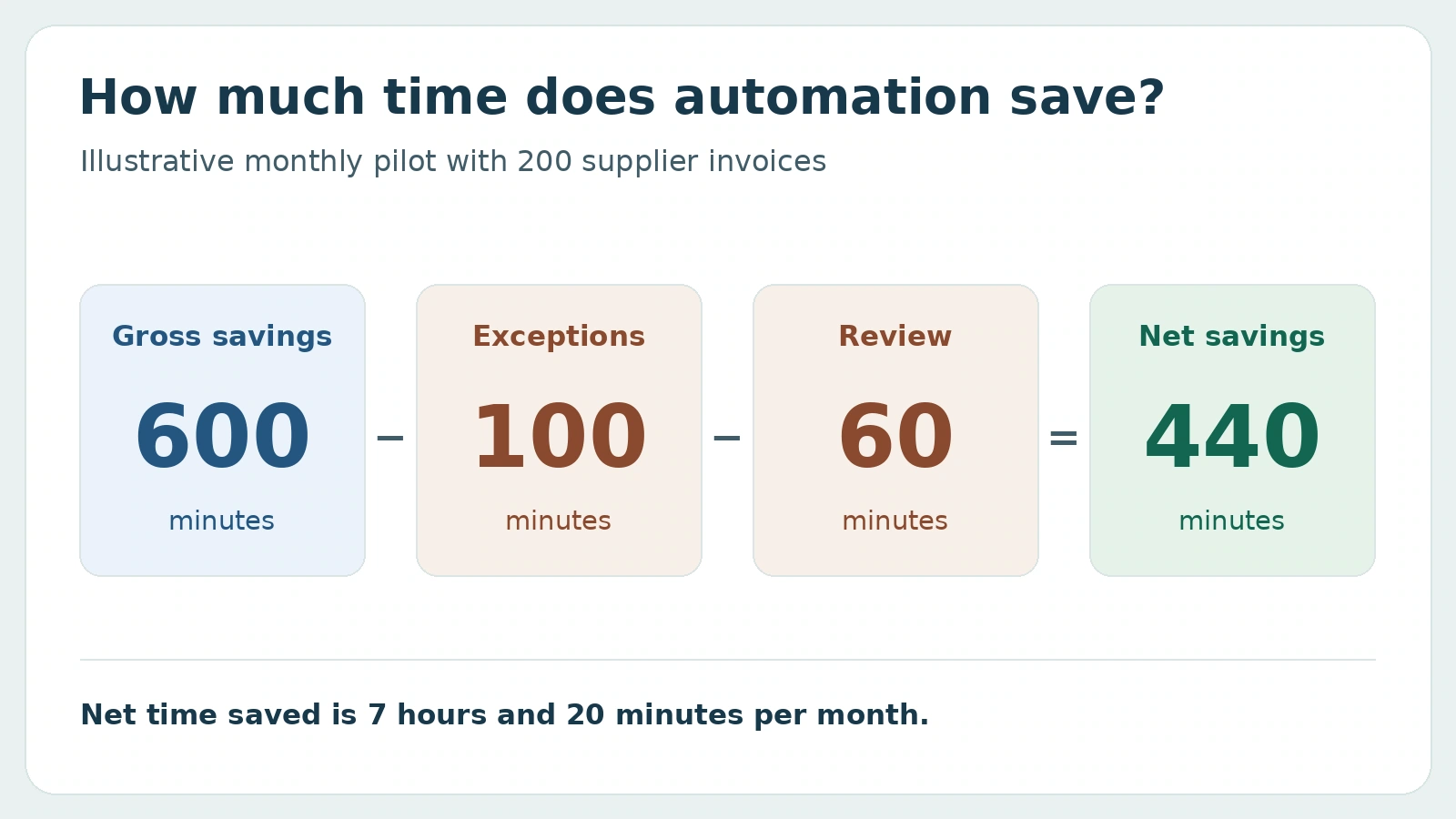
The manual process takes 800 minutes a month. The new workflow takes 200 minutes of routine handling, 100 for exceptions, and 60 for review. The difference is 440 minutes, or seven hours and 20 minutes. At a loaded labor cost of $45 an hour, that’s $330 in monthly staff time. An added subscription cost of $240 leaves $90 a month in estimated benefit before any other fees. A $900 setup cost would take about ten months to recover at that pace.
Time saved can free people for other work even when payroll stays the same. During the pilot, count corrected postings, missed approvals, duplicate entries, and failed syncs as well as minutes. If the system looks fast in the app but your bookkeeper spends the next morning fixing the ledger, include that work in the comparison.
When is an add-on worth paying for?
Keep it if the pilot shows less work from capture through reconciliation, exceptions reach an owner, and the added cost fits the savings. If most of the time goes into resolving discrepancies the app creates, fix the mapping and rerun the same batch. A second pilot with a normal month’s mix of invoices, refunds, and transfers will tell you more than a demo built around clean examples.










Comments 3