


For everyday personal spending, start with Rocket Money’s free tracking tools or Quicken Simplifi’s paid reporting and Spending Plan. Money Manager by Realbyte suits people who prefer entering purchases themselves. For receipts and work expenses, compare Expensify with Zoho Expense. The right expense tracker app depends on whether you need to understand your own spending, maintain a manual record, or submit costs for reimbursement.
A useful app should produce a spending total you can explain. Before subscribing, check the transactions it includes, the features its free plan excludes, and whether you can export a usable record. A polished dashboard can still give a misleading picture when transfers, refunds, and credit card payments are classified incorrectly.


What is an expense tracker app?
An expense tracker app records purchases and groups them into categories so you can see where money goes. Some import bank and card transactions. Others rely on manual entry or scan receipts to extract details such as the merchant, date, and amount. You review the entries, correct mistakes, and use the totals to make decisions.
A personal tracker helps you spot patterns and set spending limits. A business expense tool adds a different workflow, potentially including receipt attachments, expense reports, approvals, and reimbursement. Choose the workflow first, then compare the apps that support it.
Compare expense tracker apps and their costs
Prices below are in US dollars, checked November 19, 2026, before applicable taxes. Standard prices appear where available. Introductory offers, app-store billing, and plan terms can change. These recommendations reflect documented capabilities and limits rather than hands-on performance scores.
| App | Useful for | Cost to consider | Important limit |
|---|---|---|---|
| Rocket Money | Personal spending and subscriptions | Free; Premium typically $7–$14/month | Manual entries, splits, and exports need Premium |
| Quicken Simplifi | Personal reports and forward planning | $6.99/month standard, billed annually | No ongoing free plan |
| Money Manager by Realbyte | Manual tracking on Android | Free with ads; paid upgrade available | Free version limited to 15 assets/accounts |
| Expensify | Receipt capture and work expenses | Free personal tools; Collect $5/member/month | Free personal tools exclude paid workspace features |
| Zoho Expense | Small-team expense reports | Free for up to 3 users; Standard $3/user/month annually | Free scanning capped at 20 receipts/user/month |
Rocket Money for free personal expense tracking
Rocket Money is a practical starting point if your main question is where your money went. Its free tools connect financial accounts, show transactions and spending breakdowns, and identify recurring subscriptions. That covers the first job many people want a tracker to do without another monthly subscription.
Premium matters when your records need more editing. Manual transactions, splits, custom categories, rules, and transaction export sit among its advanced features. If you regularly pay cash or need to divide a supermarket purchase between groceries and household supplies, confirm the offered Premium price before building your workflow around those tools. See Rocket Money’s free and paid features.
For more detail on subscription cleanup alongside spending records, see our Rocket Money review.
Quicken Simplifi for tracking that feeds a spending plan
Simplifi connects expense tracking with a plan for the money still available. Its Spending Plan accounts for income, bills, subscriptions, planned spending, and savings goals. Reports help you examine past spending, while projected cash flow looks ahead. It fits someone who wants to use transaction history to make decisions about the coming month.
The standard annual-billing price of $6.99 per month equals $83.88 per year. Check the renewal amount separately from any first-year discount. Choose it if you will use the planning and reporting tools alongside tracking. Review Simplifi’s current features and pricing before purchasing.
If you are moving away from an older personal finance system, compare Quicken alternatives and check that your transaction history and exports remain usable.
Manual tracking and business receipt apps
Money Manager by Realbyte for manual expense records
Money Manager suits someone who wants to enter purchases, maintain account balances, and review category totals. Its Android app supports expense and budget graphs, transfers, recurring entries, and backup or restore tools. Recording a purchase yourself can make a small cash expense visible immediately, provided you keep up with entry.
The free Android version contains ads and limits you to 15 assets, meaning the accounts you track inside the app. The paid version removes ads and expands that limit. Check the exact app and platform before paying because several products use similar names. The official Money Manager listing identifies Realbyte as the developer.
For more personal options, our free budgeting apps comparison explains which free plans also help allocate money before you spend it.
Expensify for receipt capture before a paid team workflow
Expensify’s free personal tools include unlimited SmartScan receipt scans, manual expense entry, distance tracking, and CSV or spreadsheet export. Export is available on the web, so plan to use a desktop browser when you need the file. These tools can suit an individual collecting receipts without a paid workspace.
Its free personal workflow excludes features such as categories, tags, automatic reimbursement, and accounting integrations. Check Expensify’s free-feature guide against the task you need to complete. Unlimited scanning alone does not establish that a free account can run your company’s approval process.
For new Collect workspaces, the published US price is $5 per unique member per month on pay-per-use billing. Older workspaces can have different terms. Review the current pricing and legacy-plan rules. Employees should first ask which expense platform and report format their employer accepts.
Zoho Expense for a small team with clear scanning limits
Zoho Expense’s free US plan supports up to three users and includes expense reports and receipt capture. Automatic scanning is limited to 20 receipts per user each month. After that, you can still create expenses manually or upload receipts for recordkeeping. This distinction matters if you expect every uploaded receipt to be transcribed automatically.
Standard costs $3 per user per month billed annually, or $4 with monthly billing, and includes 200 scans per user per month. Zoho’s subscription guide specifies a three-user minimum for Standard. At the annual rate, that minimum totals $108 per year before tax. Confirm your license count and Zoho Expense’s US plan limits when subscribing.
If you also need bookkeeping, compare the tracking features already included in your small-business accounting software. Drivers should separately check the trip-recording workflow in our mileage tracker app comparison.
Keep client-reimbursed costs identifiable rather than mixing them into ordinary household spending. Our billable expense income guide explains how the original cost and its recovery relate.
A worked example that prevents double counting
Suppose you track your bank account, credit card, and cash wallet. These illustrative transactions occur in one week, including the clothing refund. Personal spending excludes savings transfers and reimbursable work costs.
| Transaction | Personal spending | How to record it |
|---|---|---|
| Groceries $84 | $84 | Grocery expense |
| Gas $46 | $46 | Transportation expense |
| Household supplies $30 | $30 | Household expense |
| Clothing $60, then a $20 refund | $40 | Purchase and refund in the same category |
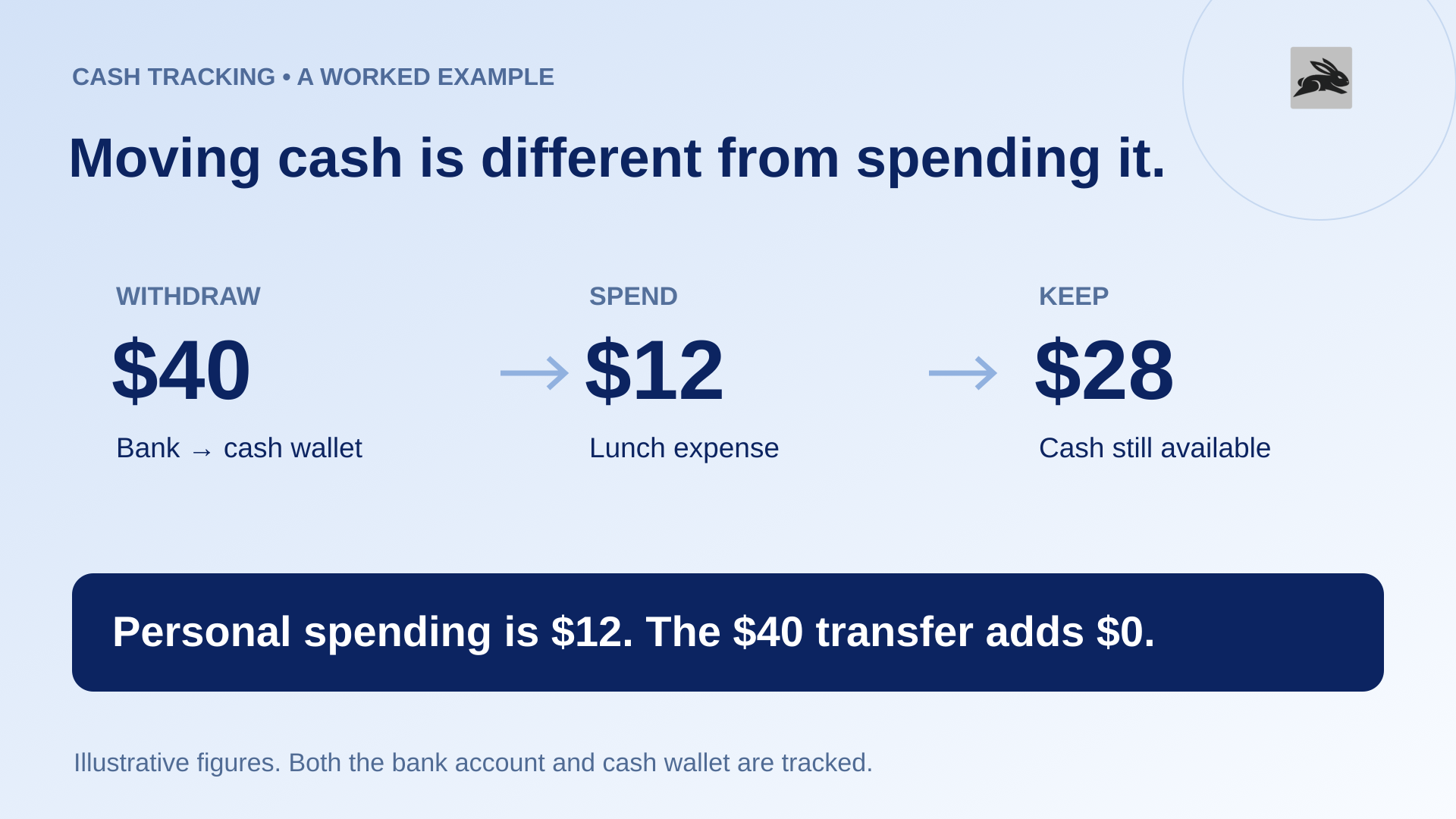
| Withdraw $40 cash, then buy $12 lunch | $12 | Transfer $40 to cash; record lunch separately |
| Pay $130 toward recorded card purchases | $0 additional | Transfer/payment settling existing purchases |
| Move $200 into your savings account | $0 | Transfer between your own accounts |
| Pay $24 for work, then receive $24 back | $0 net personal cost | Track the work expense and its reimbursement separately |
Personal spending totals $212, calculated as $84 + $46 + $30 + $40 + $12. Your cash wallet ends with $28. The $24 work cost remains visible in your reimbursement record until repaid. It should not quietly consume your personal dining or transportation allowance.
The card-payment treatment assumes purchases are already recorded, with no interest or fees in the payment. If you track only checking, verify how card purchases enter the app before excluding payments.
If recurring charges are the part you most want to control, compare subscription tracker apps for charge discovery, renewal reminders, and cancellation help.
How to choose an expense tracker you will keep using

Shortlist two apps and try representative transactions before importing years of history or choosing annual billing. Check whether you can maintain accurate records with your available time.
Check capture, corrections, and exports
For automatic tracking, connect the bank and card accounts you really use. Compare several recent posted purchases with statements, and check whether pending entries later appear twice. For manual tracking, enter a cash purchase, a recurring bill, and a transfer. Make sure changing a mistaken category takes little effort.
Consistent categories also make it easier to distinguish fixed and variable expenses when you turn the transaction history into a budget.
For receipt scanning, try a clear receipt and a faded one. Verify the date, total, merchant, and currency against the original. Then export a sample file and inspect its fields. Business users should also confirm that receipt images, project details, and required report fields remain accessible in the format their employer or accountant needs.
Compare the full cost and data access
Write down the annual total, renewal price, number of paid users, scanning quota, and any export restrictions. Include time spent correcting records in the decision. A free app that requires daily entry can still work well if you enjoy maintaining the record. A paid connection earns its cost only when it saves useful effort.
Before linking accounts, review the requested permissions, authentication options, deletion process, and data-sharing terms. Check who can see shared records. An app’s ability to connect a bank does not establish that every account type or historical transaction will import correctly, so confirm completeness during your trial.
Turn the spending history into a useful budget
Review categories once a week, resolve transfers and refunds, and compare totals with the original accounts. After a full month, set realistic limits for the next one using that cleaned-up history. Our monthly budget guide and usable template helps turn those totals into a plan for bills, everyday spending, and savings.











Comments 3