


Actual Budget is worth trying if you want a free, open-source envelope budgeting app and are comfortable entering or importing transactions. In our hands-on test, it made a grocery shortfall easy to spot and fix. The bigger decision is how you want to use the app. A single-computer budget can stay local, while bank connections and automatic syncing between devices need a server.
Try Actual if you want to decide what the cash you already have needs to cover. Consider YNAB if you want a similar budgeting approach with managed device access, dedicated mobile apps, and built-in bank connections where supported. The best choice depends on whether you want to manage the setup yourself.


What is Actual Budget?
Actual is personal finance software that gives each dollar a job. You assign money to categories such as bills, food, and savings, then record purchases against those categories. Each category’s balance shows what is still available for that purpose. The desktop client can work locally, and a sync server can share the budget between devices. Actual also offers a tracking budget mode. We used the envelope mode for this review. Actual Budget’s project overview.
The first question to ask is what the money in your accounts has to cover before your next payday. A checking balance can look comfortable while much of it is already spoken for. In an envelope budget, you can look up the amount you set aside for groceries before deciding what to buy. When income varies, you can repeat that decision each time money arrives.
What happened in our Actual Budget test
We started a fresh budget in the official browser demo on November 12, 2026. The app reported version 26.11.0 and no server. We used fictional transactions and a mock bank balance. The test covered opening an account, entering a purchase, allocating money, covering an overspent category, and reconciling the register. Details about hosting, bank feeds, and mobile use come from the project’s documentation.
One purchase produced two useful balances
We added Sample Checking with a $1,000 opening balance and entered a $145 payment to Sample Market in the Food category. The checking register showed $855. We assigned $120 to Food, $180 to General, $600 to Bills, and $100 to Savings. The app showed $0 To Budget because we had assigned all $1,000. Food still showed −$25 because we had assigned $120 and spent $145.
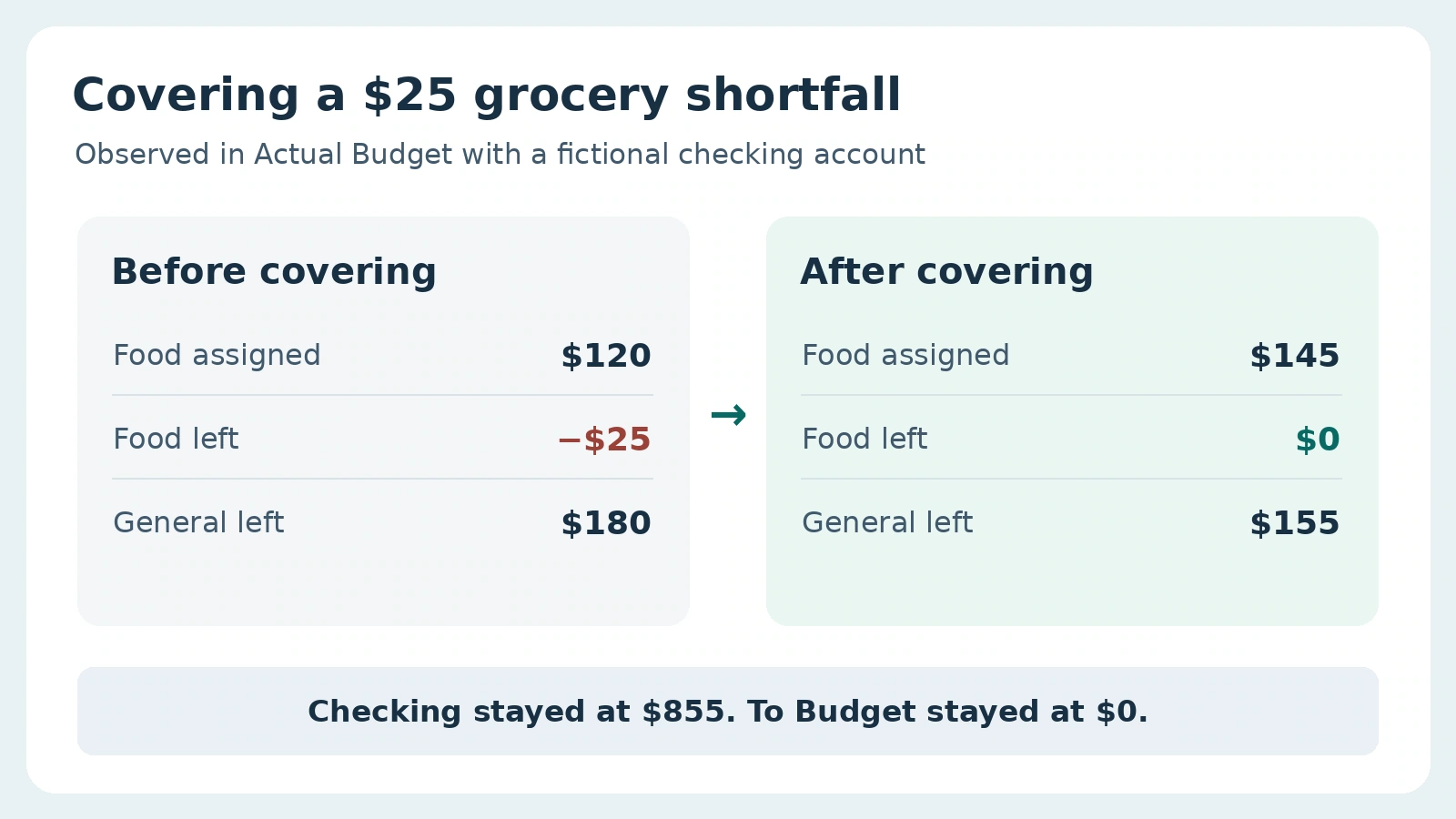
We clicked the negative Food balance, chose Cover overspending, and selected General as the source. Actual suggested the exact $25 needed. After the move, Food had $145 assigned and $0 left. General had $155 left. The register stayed at $855 because moving money between budget categories changes the plan for that cash.
This was the strongest part of the test. The negative balance showed the exact tradeoff before we needed to make another spending decision. The interaction also exposed a small learning curve. Clicking a number in the Budgeted column edits the allocation, while clicking the Balance column opens actions such as covering overspending.
What reconciliation revealed
We entered $855 as a mock bank balance. The account register already showed $855, but the reconciliation panel showed a $1,000 cleared balance and a $145 difference. The purchase was still uncleared in Actual. Once we marked it cleared to match the mock statement, the app confirmed the reconciliation. We did not need an adjustment transaction.
That distinction matters if you enter purchases as they happen. A new purchase can already affect your spending envelope even while the bank shows it as pending. During reconciliation, compare the bank’s posted transactions with the cleared entries in Actual. A difference that matches one purchase is a useful clue. Find the entry and check its status before creating a balance adjustment.
The weekly routine this test points to
Set aside a few minutes to check for missing transactions, confirm that any imported transfers are linked correctly, and resolve negative envelopes. Then reconcile against a statement or posted balance. If you use an on-budget credit card for groceries, the purchase belongs in Food. The later payment from on-budget checking to the card is a transfer between accounts. Linking both sides helps you avoid counting the payment as a second grocery purchase. Actual’s guide to transfers.
For recurring categories, start broad. A single Food envelope is enough to learn the workflow. Split groceries and restaurants when the distinction would help you make different decisions. If you need a realistic starting point for groceries, IncomeBunny’s monthly food budget for one guide walks through how to build one.
At month-end, unused money can stay in its category. That is useful for irregular bills. For example, assigning $30 a month to an annual fee would build a $360 balance over 12 months if you leave it untouched. By default, overspending you leave unresolved reduces the next month’s available funds. Review any negative categories before assigning the next month’s money. Actual’s explanation of month-end balances. For predictable bills that come due less often than once a month, see how to set up a sinking fund.
How much Actual Budget costs in the US
Actual has no software subscription. What you pay depends on whether you need a hosted server or automated transaction imports. These examples use advertised rates checked November 12, 2026, before any applicable taxes or extra hosting resources.
| Setup | Illustrative yearly cost | What you are paying for |
|---|---|---|
| Desktop with manual entry or file imports | $0 in app fees | Local budgeting on one computer. |
| Managed hosting with manual imports | From $24 | PikaPods hosting at its advertised starting price of $2 per month. |
| Managed hosting with SimpleFIN | From $39 | Twelve months of entry-level hosting plus a $15 annual SimpleFIN plan. |
| Self-hosted server | Depends on your setup | Your hardware or hosting costs, plus a bank connector if you use one. |
SimpleFIN is also listed at $1.50 month to month, which is $18 over 12 months. Managed hosting makes sense when you want phone and desktop access and prefer someone else to operate the server. A household that only wants a desktop budget with manual imports can skip both charges. Actual’s installation guide, PikaPods hosting prices, and Actual’s SimpleFIN setup and rates.
How US bank sync and file imports differ
Actual’s US bank integration uses SimpleFIN Bridge and requires an Actual server. Check the SimpleFIN supported institutions list for the accounts you actually use, especially if you need a local credit union or several cards. Confirm that your specific account type is available before building your routine around the feed.
Starting with version 26.11.0, linked accounts can fetch transactions on an interval while Actual is open. The app can catch up when reopened, and you can also fetch manually. If you prefer to avoid a connection, Actual supports statement files including CSV, OFX, QFX, QIF, and CAMT. Start with a short date range and check the sign on deposits and withdrawals before importing more. Bank sync behavior and supported import formats.
Should you use Actual Budget or YNAB?
Actual is a good fit if you want a local budget, value control over where it lives, and are willing to reconcile it regularly. Its desktop client gives you a way to start without configuring a server. If you plan to budget from your phone, factor in server setup and the mobile web app. The local browser version is convenient for testing. For long-term use, the project recommends a more durable setup and backups. Actual’s setup options.
YNAB lists US prices of $109 annually or $14.99 monthly and a 34-day trial. Its subscription covers the managed app experience, with device access and supported direct bank imports. The starting Actual hosting-and-sync example above costs $70 less per year than YNAB’s annual plan. Decide whether the difference is worth your setup time and which phone workflow you’ll actually use. See YNAB’s current pricing and IncomeBunny’s YNAB versus Monarch comparison.
What local-first means for your data
Actual can keep a local copy of your budget, and optional end-to-end encryption protects budget data sent to a sync server. Its bank connection secrets are stored separately on the server and fall outside that budget encryption. The hosting decision therefore matters more when you connect a bank. Keep a backup you can restore even if you use a managed host. Actual’s bank-sync security notes and backup guide.
If two partners need to manage shared spending, our couples budgeting app comparison provides a separate checklist for visibility, logins, bill splits, and reimbursements.
Try one pay cycle before moving your whole budget
Start with one checking account, a few real spending categories, and a short slice of transactions. Cover one overspent category and reconcile at least once. If you plan to migrate, keep your old export, check balances and categories in the new budget, and review Actual’s migration guide for the import path that matches your previous app. If envelopes feel like more detail than you need, compare the workflows in IncomeBunny’s free budgeting apps guide.
Use three checks to decide whether to keep going. See whether you can tell what’s available for a purchase in under a minute, whether the register matches your bank after clearing transactions, and whether you can find and save a backup. If one check takes longer than expected, fix that part of the routine before bringing over more accounts or paying for a server.
Our test made the tradeoff clear. Actual made it easy to see which category would give up money to cover an unexpected purchase. It also required us to pay attention to what was assigned, what was spent, and what had cleared. If that distinction helps you make spending decisions, the app is worth the setup.












Comments 1