


Monarch is our first choice for couples who want one shared financial overview. YNAB is a better fit when you want available cash to guide spending decisions, while Honeydue is a useful free starting point with account visibility choices. Goodbudget suits couples who prefer digital envelopes. If your main problem is working out who owes whom, consider Splitwise alongside your budget.
The best budgeting apps for couples make your agreed money arrangement easy to maintain. Separate logins, private purchases, shared goals, and reimbursements matter as much as the subscription price. An app that fits couples combining everything can feel intrusive when both people want to keep personal spending separate.


Start with how you want to share money
Choose whether you will track all finances together, share a budget for joint costs, or keep individual budgets and settle shared expenses. Then agree on what each partner can see. Keeping separate bank accounts still allows a shared plan, but importing those accounts can expose transactions you intended to keep private.
Before choosing an app, write down three rules. Decide which costs count as shared, how you will divide them, and when you will settle up. Use those rules to check the options below.
Compare costs and limits for two people
US web prices were checked November 19, 2026, before applicable taxes. Compare the recurring cost after any introductory offer. The paid budgeting subscriptions below include the sharing arrangement described, while Splitwise Pro depends on the plan selected.
| App | Choose it for | Cost for two | Important limit |
|---|---|---|---|
| Monarch Core | A shared financial overview | $99.99/year or $14.99/month | Both partners see all connected accounts and transactions |
| YNAB | Planning spending from available cash | $109/year or $14.99/month | Group manager can access members’ plans |
| Honeydue | Free tracking with selective sharing | $0, optional tips | Bank update timing varies by institution |
| Goodbudget | Shared envelope budgeting | Free, or Premium $80/year or $10/month | One household login, two mobile devices free |
| Splitwise | Calculating reimbursements | Free, Pro price shown when subscribing | Free users can currently add four expenses per day |
Monarch for couples combining most finances
Monarch fits partners who want connected accounts, a shared budget, savings goals, and a broad view of their money. Both people use separate logins under one subscription. Its Shared Views feature lets you assign account and transaction ownership, which helps identify personal and shared spending while reviewing the household picture.
The main limitation is visibility. Monarch’s household guide says both partners can see every connected account and transaction. A personal ownership label helps organize records, and access remains shared. Choose it when you both want that level of transparency. If you want a private personal account, consider whether to leave it outside the shared dashboard. Check Monarch’s household permissions before linking accounts.
YNAB for couples who want to plan before spending
YNAB asks you to give available cash a purpose. You fund categories for bills, everyday spending, and goals, then adjust those allocations when life changes. It suits couples who need a clear answer about what they can spend before the next payday and are willing to keep category balances current.
One subscription includes up to six people with separate logins. Partners can share a joint plan and create other plans, but YNAB gives the group manager access to plans created by members. The manager chooses which of their own plans to share. Read the YNAB subscription-sharing rules together before assuming each personal plan has equal privacy.
Our YNAB vs Monarch comparison explains the difference between assigning available cash and managing a broader household dashboard.
Free options and shared expense tracking
Honeydue for couples keeping some finances private
Honeydue is designed for couples who want to track money together while choosing what to reveal. You can share an account’s balances and transactions, share its balances alone, or keep it private. Its core app is free, and the company describes tips as optional.
That makes Honeydue a sensible starting point when you share bills but want to keep personal purchases outside the conversation. Decide what to share before connecting everything. Its account visibility guide explains the choices. View the result from both phones so each person knows what the other can see.
Check transaction completeness as well. Honeydue’s support documentation says bank update timing varies. During setup, compare recent purchases with statements and keep track of any missing entries. If a $0 subscription is your priority, our free budgeting apps comparison covers the limits across more options.
Goodbudget for couples who prefer envelopes
Goodbudget gives spending categories a digital envelope balance. It suits partners who want to check the grocery or dining envelope before a purchase and are comfortable maintaining the records. The free plan includes 10 regular envelopes, 10 annual or goal envelopes, one account, and two mobile devices. Its free workflow uses manual transaction entry.
Premium adds automatic bank sync for US banks, unlimited envelopes and accounts, five mobile devices, and seven years of transaction history. It costs $80 annually or $10 monthly. Review Goodbudget’s free and Premium limits if you need several accounts or more categories.
Goodbudget’s sharing instructions use one household username or email and password across devices. Both partners can add transactions and change the budget. This works best when you agree to maintain one common set of envelopes and accept the shared login.
Splitwise for couples settling shared bills
Splitwise records who paid, how an expense is divided, and the balance owed between people. It supports equal and unequal splits. Choose it when you maintain separate budgets and want a reliable record of shared rent, groceries, trips, or other agreed costs. You still need a plan for future bills and savings outside that settlement balance.
The free version currently allows four new expenses per user each day. Pro removes that limit and adds features including receipt scanning and default splits. Splitwise distinguishes individual subscriptions from an annual Duo plan covering two people. Check the price displayed for your chosen plan and platform before paying. Its Pro feature and plan guide explains who each subscription covers.
Start with a two-person group containing only agreed shared costs. Enter the person who paid as well as the split. A shared expense ledger works well only when both people can explain how its outstanding balance was calculated.
Work out shared bills with separate accounts
Suppose Alex pays $1,800 in rent, while Jordan pays $420 for groceries and $180 for utilities. They agree to divide all three costs equally. Total shared spending is $2,400, so each person’s share is $1,200. These are illustrative amounts for a single month.
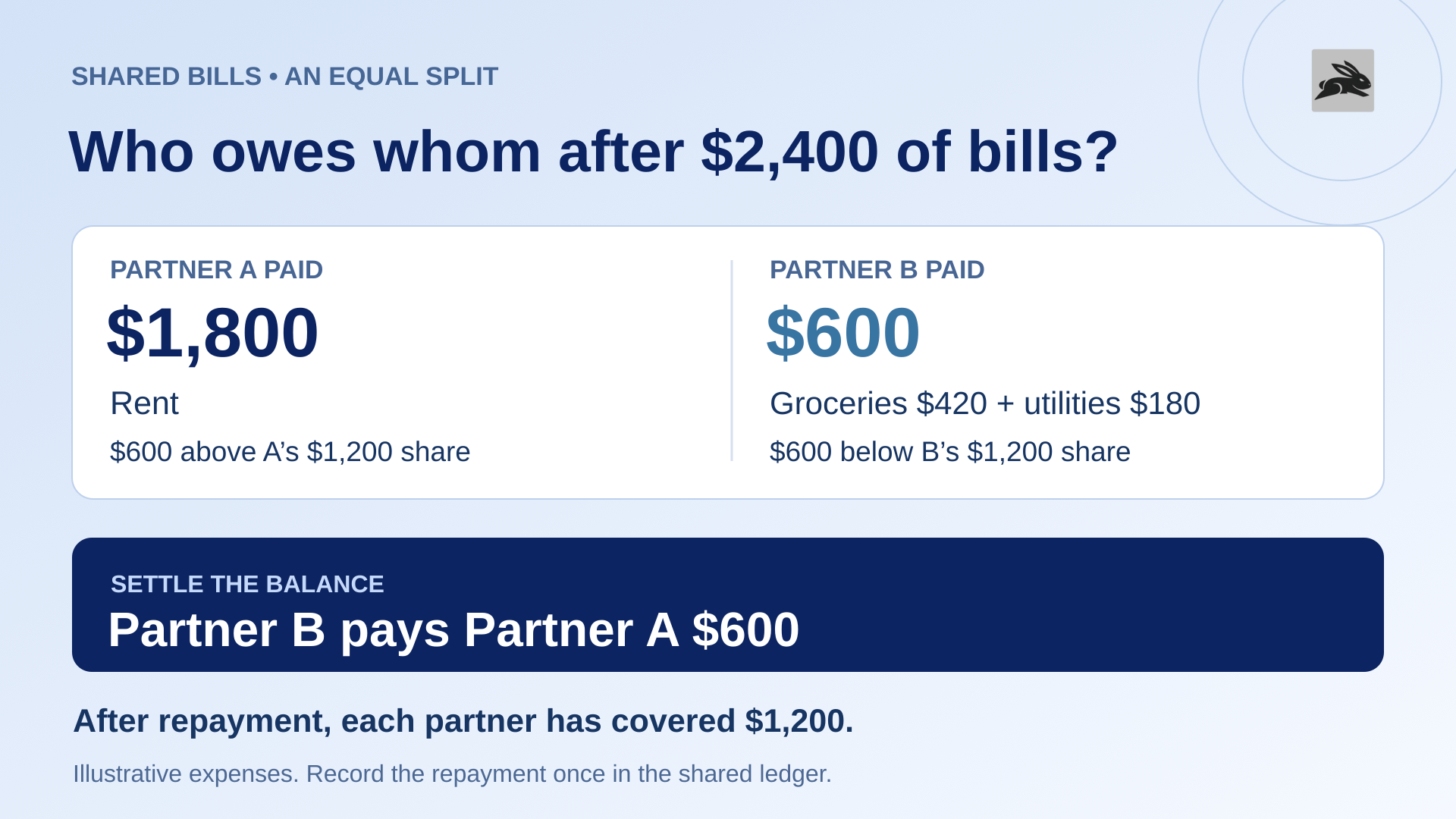
Alex has paid $600 above their share, and Jordan has paid $600 below theirs. Jordan pays Alex $600 to settle the month. After that repayment, Alex’s net cost is $1,800 minus $600, or $1,200. Jordan’s is $600 plus $600, also $1,200.
Choose the split before entering expenses
The same purchases produce a different repayment if the agreement changes. With a 70/30 split in which Alex covers 70%, Alex’s share is $1,680 and Jordan’s is $720. Jordan would then pay Alex $120. The agreement determines the result, so check the percentage on every expense or use an appropriate default setting.
In a shared budgeting app, identify each bill and its category, then keep a separate record of the settlement calculation if needed. In Splitwise, enter who paid and the agreed shares so it can calculate the balance. Ownership labels in a dashboard help you identify a purchase. Check explicitly whether your chosen app also calculates reimbursements.
For more examples of transfers, refunds, and reimbursements, see the expense tracker app comparison and its worked transaction example.
Keep repayments from distorting your budget
If both partners’ accounts appear in one consolidated budget, the $600 repayment moves money within the household. Classify both entries consistently as a transfer, so the original $2,400 of spending stays intact. In separate personal budgets, record each person’s share and the reimbursement according to the app’s workflow. Compare the final net cost with the arithmetic above before relying on the totals.
For a wider family or household setup, compare household budgeting apps on additional members, account visibility, and a seven-day shared trial.
Make the first month easy for both partners

Set up one month together before committing to an annual subscription. Gather recent statements and bill dates. Choose a few shared categories, add a goal you both care about, and agree who will review imported transactions or enter manual purchases. Our monthly budget guide and template can help you organize the figures first.
Include predictable annual bills in the plan. Our sinking fund guide shows how to set aside smaller amounts before a shared bill falls due.
Use a 15-minute weekly review
Check for missing or duplicate purchases, confirm upcoming bills, and review the amount left in shared categories. Settle repayments on the date you agreed. If a category runs short, decide together which other category can fund it. Give each person a small task so one partner can step in when the other is busy.
Give each shared goal an amount, deadline, and agreed contribution. Our financial goal tracking guide explains how to check whether the money saved matches the plan.
After a week, ask each partner to explain the available grocery balance and any amount owed. If the answers differ, trace the same transactions together. A bank connection that imports purchases still needs review for categories, transfers, and shared spending rules.
Check the cost of keeping the app
At current prices, twelve $14.99 monthly payments total $179.88. Monarch Core’s $99.99 annual plan saves $79.89 against that total, while YNAB’s $109 annual plan saves $70.88. Goodbudget Premium costs $120 over twelve monthly payments, compared with $80 annually. Choose annual billing once both people can use the app comfortably and expect to keep it for the year.
The 50/30/20 budget worksheet can provide a starting reference for needs, wants, and savings, while your agreed split determines how much each partner contributes.
Agree on how to stop sharing
Before connecting years of records, check how exporting records and removing a partner works. Decide who will keep the subscription and how to resolve an outstanding balance if you stop using it together. In a service with one shared login, review the password and signed-in devices as part of that change. Removing future access cannot recall records someone already downloaded.












Comments 2