


Monarch Money is our pick for a shared household dashboard, Moneydance for a traditional desktop register, and YNAB for actively planning spending. For free Quicken alternatives, consider GnuCash for detailed desktop accounting, Actual Budget for envelope budgeting, or Empower for an investment overview.
The right replacement depends on what you use in Quicken today. A budgeting app can make everyday decisions easier while leaving a gap in investment records, reconciliation, or bill payment. Identify those essentials before choosing a new interface.


This comparison focuses on replacing Quicken Classic for US personal finances. Recommendations reflect documented capabilities and current terms, rather than a hands-on test of every service. Prices were checked November 1, 2026; promotions and taxes can change the amount due.
The best Quicken alternatives at a glance
| Alternative | Choose it for | Cost and important limits |
|---|---|---|
| Monarch Money | Household tracking and sharing | Core $99.99/year or $14.99/month; Plus costs more |
| YNAB | Planning how to use available money | $109/year or $14.99/month; 34-day direct-signup trial |
| Moneydance | A desktop register and investments | Buy-once license; optional Moneydance Plus subscription |
| Moneyspire | Desktop records with optional online services | $59.99 promotional purchase, $99.99 list; online services included for one year |
| GnuCash | Free desktop accounting | Free and open source; more accounting setup |
| Actual Budget | Free software for envelope budgeting | Free software; hosting and bank connections can cost extra |
| Empower | Free investment and net-worth overview | Dashboard tools are free; advisory services are separate |
Annual subscriptions are paid for a year at a time. Monthly equivalents shown on a seller’s website do not necessarily mean monthly billing. The tool sections below link to current terms.
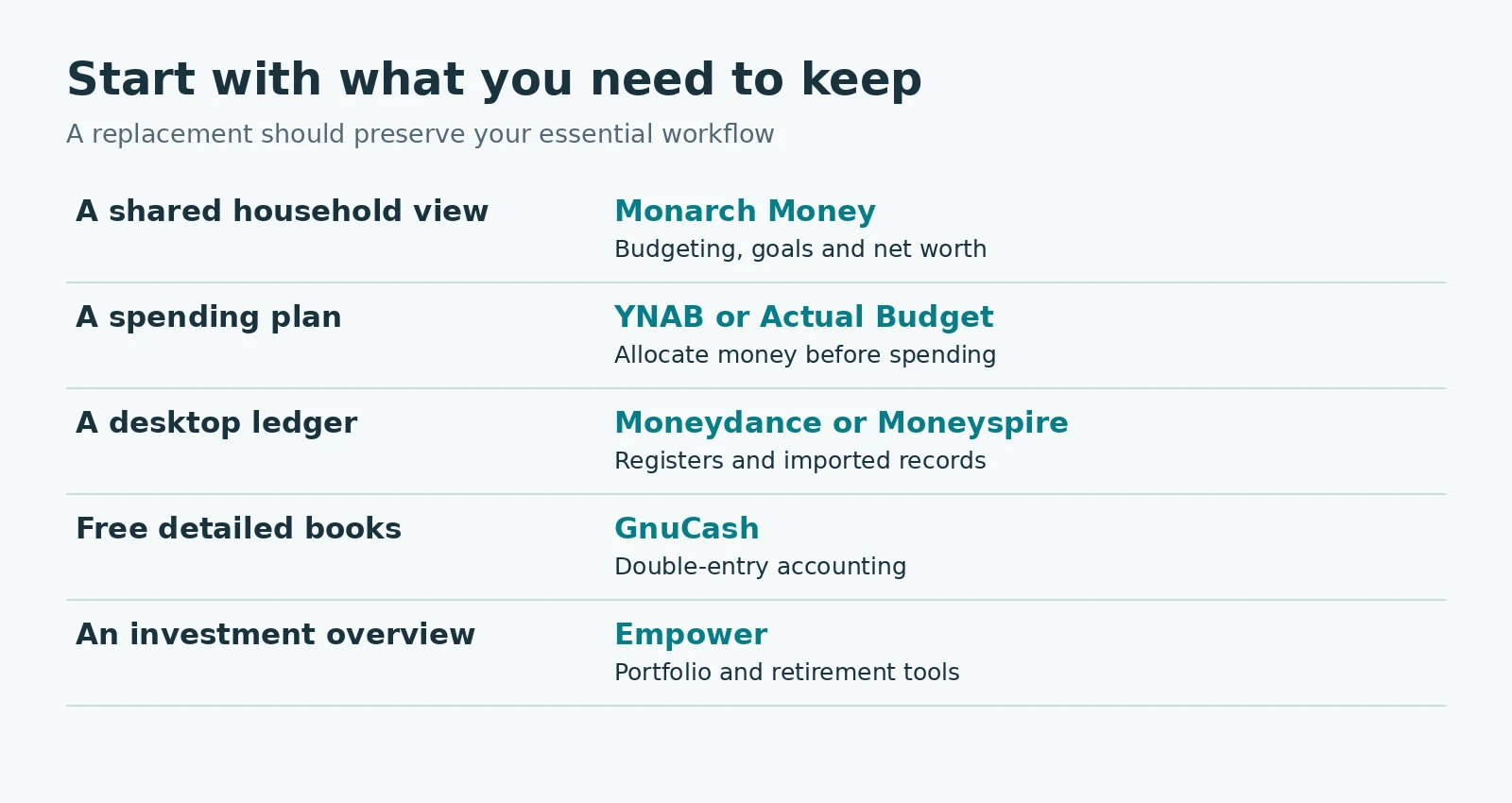
Shortlist two options that cover your essential tasks. Then test your actual banks and exported records before committing to an annual plan.
Before importing categories, separate predictable fixed expenses from variable household spending. The app should preserve that distinction rather than treating every transaction as an interchangeable cost.
If you mainly want to identify recurring charges rather than replace a desktop ledger, our Rocket Money vs Monarch guide covers subscription cleanup and ongoing household planning.
Online alternatives for household finances
Monarch Money for a shared financial overview
Choose Monarch when you and a partner want to see spending, goals, debts, and investments together. It supports household collaboration at no extra cost, making it a sensible replacement for people who mainly used Quicken to understand their overall financial position.
The Core plan costs $99.99 annually or $14.99 monthly. Plus is $199.99 annually and adds forecasting, business-income tools, and advanced investment analysis. Start with Core unless a specific Plus feature solves a recurring need.
For migration, Monarch supports CSV imports of transactions and historical balances. These are different datasets: importing old purchases alone does not recreate a complete net-worth timeline. It is best approached as a household tracking system, with any indispensable Quicken reports checked individually.
YNAB for a more deliberate spending plan
YNAB suits readers who want to decide what their money will do before spending it. You assign available money to priorities and adjust the plan when circumstances change. That requires regular attention, so choose it if budgeting decisions are the problem you want to solve.
YNAB’s subscription is $109 annually or $14.99 monthly, plus applicable tax. Signing up directly provides a 34-day trial without a credit card. Twelve monthly payments total $179.88, so annual billing saves $70.88 if you keep it for a full year.
Investment accounts can be tracked as balances, but YNAB is a poor substitute for a detailed securities ledger. If you depend on tax lots or investment transaction history, keep that requirement separate from your household budget.
For a closer look at cash allocation versus a household dashboard, our YNAB vs Monarch comparison uses the same household example to show how the two workflows differ.
Empower for a free investment overview
Empower’s Personal Dashboard combines connected accounts with portfolio analysis, retirement scenarios, net worth, and spending tools. It is a useful free alternative when your main reason for opening Quicken is reviewing investments across institutions.
An investment overview does not explain every fee. Check the underlying funds’ expense ratios separately from any app subscription or advisory charge.
The free dashboard is separate from Empower’s advisory services. Treat it as an overview and planning tool; confirm how you will preserve historical transactions and reports before retiring a detailed desktop ledger.
Actual Budget for control over an envelope budget
Actual Budget is free, open-source software with a local-first design and envelope budgeting. It is a good fit if you want to allocate money you already have and accept responsibility for setup, backups, and maintenance. It can import common financial files, including QIF, OFX, QFX, and CSV.
Free software does not make every setup free. Optional hosting costs extra, and its SimpleFIN connection guide lists $15 annually or $1.50 monthly for that US and Canadian bank service. Bank sync requires an Actual server. Optional end-to-end encryption protects budget data, but bank-sync tokens on the server are outside that protection. Compare free budgeting apps with and without bank sync to see which tools include automatic imports at no cost and which work with manual entry.
If sharing is your main reason for switching, compare household budgeting apps on who can see connected accounts, how many members can join, and the annual household charge.
Desktop Quicken alternatives for Windows and Mac
Moneydance for registers and investment records
Moneydance is a strong starting point if you want familiar account registers, statement reconciliation, reminders, reports, and investment tracking. It runs on Windows, macOS, and Linux, so it also suits households that use different desktop operating systems.
Its buy-once license includes the next major release and allows continued use without another purchase. Moneydance Plus is an optional subscription for bank downloads through its aggregation service. Compare the license and connection costs separately; buying the desktop app does not include every online service.
Moneydance documents QIF as its migration route for Quicken records. Confirm that your Quicken version can export a compatible file, especially on Mac. A successful import still needs reconciliation and checks of transfers, securities, and cost basis before you rely on it.
Moneyspire for desktop records and optional connectivity
Moneyspire lets you use personal finance records offline or add online features. Its registers, bill reminders, budgeting, and reporting make it a practical option for people who want desktop money management without having to use a hosted dashboard.
The Moneyspire 2027 purchase page lists a $59.99 promotional price against $99.99 list. The perpetual license does not expire. Bank sync, cloud sync, stock quotes, and currency-rate downloads are included for one year; continuing those services currently requires a $49.99 major-version upgrade.
Its import tools accept QIF/QMTF and other financial formats. Test your file before purchase, and pay particular attention to currency settings: QIF/QMTF imports do not carry currency information. The software purchase and ongoing connected services deserve separate budget lines.
GnuCash for a free desktop accounting system
GnuCash is free, open-source accounting software for Windows, Mac, and Linux. It supports double-entry accounting, reconciliation, investment accounts, scheduled transactions, reporting, and small-business functions. QIF and OFX import are among its data-transfer options.
It suits readers who value detailed books and are willing to learn accounting structure. A transfer moves money between accounts; an expense records where money was spent. Understanding that distinction matters more here than a polished mobile dashboard. Plan to manage backups and check bank-connection options yourself.
When Simplifi or staying with Quicken makes sense
Quicken Simplifi can suit someone who wants a web and mobile spending plan while staying with Quicken. However, it is a separate subscription, and the Classic data file does not move directly into it. Quicken’s product comparison confirms that Simplifi lacks traditional reconciliation and bill payment, although CSV transaction imports are supported.
Keep Classic on your shortlist if it already handles essential investment, rental, or business records well. For small-business use, check invoicing, receivables, tax reports, and payroll needs individually. A household spending dashboard may replace only part of your workflow.
How to switch without losing track of your records
Choose a statement closing date as your migration checkpoint. Use a copy of your data for experiments and keep the original archive untouched.
1. Back up and export. Save the native Quicken backup plus reports you need to read independently. Export a format the destination accepts. Quicken’s Windows help documents QIF export options; menus and available formats vary by platform and version. QXF and QFX are different formats and are not substitutes for QIF.
2. Import before connecting live accounts where practical. Start in a fresh test file or follow the destination’s migration instructions. Check date formats, positive and negative amounts, categories, split transactions, and account mapping.
3. Compare the same closing date. Match account balances and posted transactions to statements. Check that transfers appear in the correct accounts and do not inflate income or spending. For investments, compare share quantities, cash, and cost basis against brokerage records.
4. Test connections and everyday work. Connect your actual institutions, check for overlap with imported transactions, and use the new app through a statement cycle. Verify your important reports and any bill-payment process separately.
5. Close the transition deliberately. Export from the new tool to check that you can retrieve usable records. Cancel the old subscription only after validation, confirm payments are scheduled correctly, and retain the archive and supporting documents.

When annotating statements, work on a copy and preserve the unmodified statement as your reference.
A migration check that catches misleading totals
Here is a hypothetical checking-account example. The statement starts at $2,000, shows $3,000 in deposits and $2,400 in withdrawals, and closes at $2,600. The imported ledger should give the same result for the same posted period.
| What you find | Likely explanation | What to check |
|---|---|---|
| Imported closing balance is $2,725 | $125 too high | A missing $125 withdrawal, duplicate deposit, or incorrect opening balance |
| Balances match but expenses are inflated | A transfer may be classified as spending | Both sides of transfers and credit-card payments |
| Transaction counts differ | Missing records, duplicates, or different split handling | Posted dates, amounts and split details rather than count alone |
| Net worth jumps at the switch | History or opening values may be incomplete | Historical balances, account mapping and manual assets |
Do not add a balancing adjustment merely to hide an unexplained difference. First check the opening balance, missing transactions, duplicates, and pending-versus-posted dates. A matching balance is necessary, but it does not prove categories or investment records are correct.
For Monarch, use its manual import guidance to distinguish transactions from balance history. Connecting a bank may supply only a limited history, so a fresh connection cannot be assumed to recreate years of Quicken records.
Protect the files you create during the move
Financial exports can expose account details and transaction history. Store the archive securely, keep a backup, and remove unnecessary working copies after validation. Clearing a browser’s download list does not remove the exported file itself.
Enable the new service’s available multifactor authentication and keep a recovery method. If sign-in stops working, consult the service’s official support before deleting accounts or reinstalling the app.
Common questions about replacing Quicken
Can I use a Quicken alternative without connecting my bank
Yes. Desktop tools such as Moneydance, Moneyspire, and GnuCash support manually maintained records and file imports. Actual Budget also supports file imports. You trade automatic downloads for more responsibility to enter transactions, reconcile statements, and back up the data.
Should I move decades of history or start fresh
Move the history if you need it for ongoing reports or investment records and can validate the conversion. Otherwise, a verified opening balance and a recent transaction period may be easier to maintain, while older records remain in a separate archive. Preserve the documents and detailed records you still need; do not assume a summary balance replaces them.












Comments 5