

Rocket Money is the strongest starting point here for finding recurring charges and requesting cancellation help. Choose PocketGuard when you also want budgeting, Bobby for a simple manual list on iPhone, or TrackMySubs for web-based renewal reminders. The best subscription tracker apps solve different problems, so decide whether you need to discover charges, remember renewal dates, or get help stopping payments.
Start with free tracking if it covers your needs. Paying for another app makes sense when its features save you enough money or effort to justify the cost. This comparison focuses on documented capabilities, prices, and limits, without assigning hands-on testing scores.


Choose automatic or manual subscription tracking
Automatic trackers look for recurring charges in connected financial accounts. They can surface services you forgot about, but their usefulness depends on the accounts and transaction history available. A free trial with no charge yet gives a transaction-based detector little to identify. Add its deadline yourself.
Manual trackers store the subscriptions and billing dates you enter. They suit people who already know their subscriptions or prefer to avoid linking accounts. You must maintain the list when prices change. Keep the billing provider, cancellation deadline, and renewal date together so a reminder arrives while you still have time to act.
Compare subscription tracker apps and costs
US prices were checked November 19, 2026, before applicable taxes. Offers and app-store prices can vary. An annual price requires an annual payment, even when advertised with a monthly equivalent.
| App and platform | Tracking method | Cost to consider | Main limitation |
|---|---|---|---|
| Rocket Money iPhone and Android; paid web access | Connected accounts | Free tracking; Premium typically $7–$14/month | Cancellation assistance requires Premium and supports selected providers |
| PocketGuard iPhone, Android, and web | Connected accounts | 7-day trial; $74.99/year or $12.99/month | Cancellation guidance requires you to complete the cancellation |
| Bobby iPhone | Manual entry | Free download; $0.99 subscription-limit unlock listed | You must add subscriptions and keep billing details current |
| TrackMySubs Web | Manual entry or CSV import | Free for 10 subscriptions; Unlimited $10/month or $99.99/year | A reminder and management tool rather than automatic charge discovery |
Rocket Money for finding and canceling subscriptions
Rocket Money’s free mobile tools identify recurring subscriptions from linked accounts. That makes it a useful first pass when your problem is forgotten charges across several cards. Review the detected list against statements, especially for annual renewals or purchases made through a billing platform.
Premium typically costs $7–$14 per month under its published pricing guidance. It adds cancellation assistance and web access. Free users can view subscriptions and cancel directly with providers. Check the amount and billing terms offered to you in Rocket Money’s current pricing guidance.
Our Rocket Money review takes a closer look at free tracking, Premium features, and checking that a cancellation actually stops renewal.
Assistance is a request handled by its team. Some providers require you to cancel yourself, and a charge can occur before a cancellation is confirmed. If renewal is imminent, use the biller’s direct cancellation route. Our Rocket Money vs Monarch comparison covers the wider choice between subscription cleanup and household budgeting.
PocketGuard for subscriptions inside your budget
PocketGuard detects recurring bills and subscriptions, then places them within a broader view of spending. Its recurring-payment page advertises notifications three days before upcoming charges. You can review the detected list and add missing items, which is useful when an annual renewal needs particular attention.
Its cancellation feature provides instructions. You complete the cancellation with the service or billing platform, then update the tracker. That distinction matters when comparing it with Rocket Money’s paid assistance.
The published Premium price is $74.99 annually or $12.99 monthly after a seven-day trial. The pricing page also lists a $149.99 lifetime option. Compare the offer shown at checkout, including the renewal date and refund terms, against PocketGuard’s current plans.
Manual subscription trackers without bank linking
Bobby for a small subscription list on iPhone
Bobby keeps the job focused. Add a service from its catalog or create a custom subscription, enter the contract details, and receive bill notifications. It suits someone who wants to see fixed costs without maintaining a full budgeting dashboard. A less common membership can still be entered as a custom item.
The US App Store lists a free download with separate in-app purchases, including a $0.99 subscription-limit unlock and a $2.99 All-in-one Pack v2. These are different products, so check what the selected purchase includes. The listing also shows a category-limit unlock. See Bobby’s official iPhone listing for current options.
Choose Bobby when you are willing to maintain accurate dates and amounts. It cannot discover a service you never enter. Add a test reminder and confirm that notifications reach your phone before relying on it for a costly renewal.
A recurring charge is only a fixed expense while its amount stays unchanged. Update your record when a provider changes the price.
TrackMySubs for web-based renewal management
TrackMySubs offers a free Starter plan for up to 10 subscriptions without a payment card. It is a useful fit for a freelancer’s software list or a household that wants to maintain renewal records in a browser. Its tools include CSV import and export, and the service emphasizes configurable alerts before payment.
Unlimited costs $10 monthly or $99.99 annually and expands subscription capacity along with organizational tools such as folders, tags, and payment types. Enterprise adds multiple users at a higher price. Multiple alert recipients and multiple account users are different capabilities, so choose the plan that matches who needs access. Review TrackMySubs’ plan limits before upgrading.
Use the free capacity first if it covers your list. A browser-based tracker can organize renewals well, but you still need to enter new contracts and update cancellations. Decide who owns that task when the list contains shared household or business services.
What to check before choosing a paid app
Match reminder timing to the contract. A three-day alert is too late if an agreement requires 30 days’ notice. Record the last date you can cancel, then set an earlier reminder with enough time to complete the process. Keep an additional calendar alert for an unusually expensive renewal.
Review permissions as well as features. Avoiding bank linking reduces the information you need to provide, but it does not establish that an app collects no data. Read its privacy disclosures, check account-deletion options, and confirm whether shared users can see amounts and payment details. For broader planning without another fee, compare our free budgeting apps.
Subscription records cover recurring commitments. For the rest of your purchases and receipts, compare expense tracker apps and review how each one handles refunds and transfers.
Work out what subscription cleanup actually saves
Suppose you have the five subscriptions below. Prices are illustrative and stay unchanged for a year. The fitness and productivity plans are approaching renewal, and you cancel them before their deadlines. No refund or early-termination fee is assumed.
| Service | Billing | Annual cost | Decision |
|---|---|---|---|
| Streaming | $18/month | $216 | Cancel |
| Music | $11/month | $132 | Keep |
| Cloud storage | $36/year | $36 | Keep |
| Fitness | $120/year | $120 | Cancel before renewal |
| Productivity software | $60/year | $60 | Cancel before renewal |
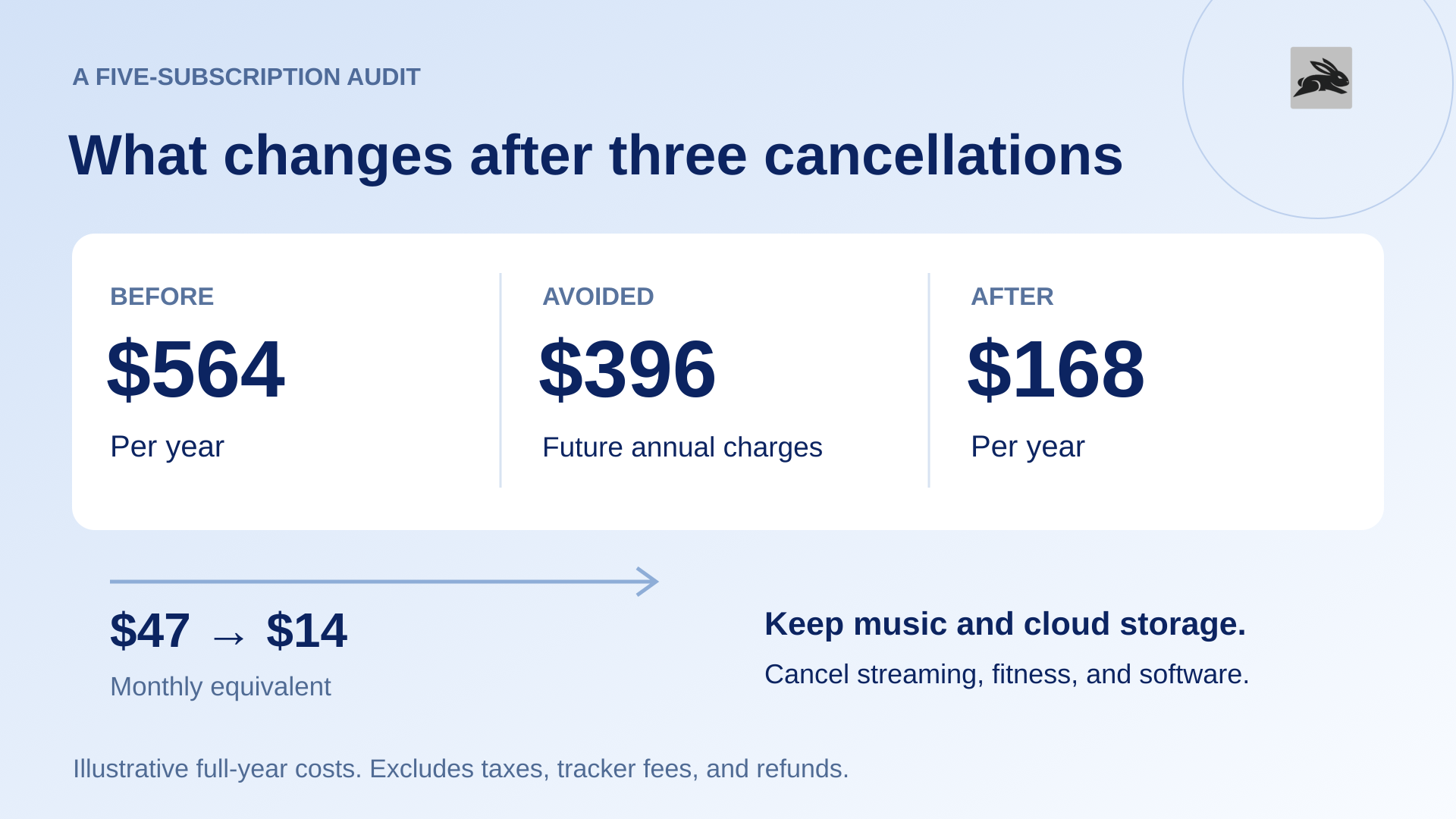
The current annualized cost is $564, equivalent to $47 per month. Canceling streaming, fitness, and productivity avoids $396 in future annual charges. Music and cloud storage remain at $168 per year, or $14 per month. These figures describe future spending, not cash refunded today.
Subtract the tracker’s cost to find net savings. If you newly bought a $74.99 annual app solely for this cleanup, $396 minus $74.99 leaves $321.01 before tax. Completing the same cancellations with free tools preserves the full $396. Separate any ongoing budgeting benefit from the savings produced by this audit.
Monthly equivalents also differ from bills due. If fitness and productivity renew next month while cloud storage does not, the original cash required that month is $209, including the $29 of monthly services. Put actual dates and set-asides into your monthly budget so annual charges stay affordable.
For a service you intend to keep, a sinking fund for annual bills can spread the saving across paydays before the renewal arrives.
Build a complete list and confirm cancellations

Gather recent card and bank statements, then look back far enough to find annual charges. Search billing emails and review app-store subscription lists. Include accounts used by your partner, employer reimbursements, and payments on a second card. A tracker sees only the information you give it or authorize it to access.
Keep a renewal record you can act on
For each service, record its price, billing interval, next charge, cancellation deadline, billing provider, and account email. Add who uses it and the last time it provided value. Mark it keep, review, or cancel. Keep annual cost separate from the next payment so you can compare value without losing sight of cash timing.
Before canceling, check for files you need to export, bundled benefits you would lose, or replacement costs. Downgrading a storage account, for example, requires checking what happens to existing files. Save the provider’s cancellation confirmation and the date access ends. Update the tracker only after you have evidence that renewal stopped.
Use the company that actually bills you
For an Apple-billed subscription on iPhone, open Settings, tap your name, then Subscriptions and select the service. For Google Play billing, open its subscription-management screen and choose the subscription to cancel. A subscription bought directly from a provider may need cancellation through that provider’s account or support team.
Deleting an app does not cancel a Google Play subscription, and cancellation does not automatically mean a refund. Google’s cancellation and access guide explains the distinction. Check the final status with the biller and review your next statement. A canceled entry in your own reminder list is only a record of what you entered.









Comments 5